Procurement Card Handbook
Quick Reference Guide
CREDIT CARD PROCESSOR
U.S. Bank
P.O. Box 6318
Fargo, ND 58125–6318
24–Hour Customer Service: 800–344–5696
PROCUREMENT & SUPPORT SERVICES
Joyal Administration Building, Room 161, Mailstop JA111
Procurement Card Program Contacts:
Procard Administrator – Kevin Taloza, x80402, ktaloza@mail.fresnostate.edu
Antoinette Castanon, acastanon@mail.fresnostate.edu
Brian Cotham, bcotham@mail.fresnostate.edu
PROCARD WEBPAGE:
https://adminfinance.fresnostate.edu/procurement/purchasing/ways/procard.html
PROCARD STATEMENT SUBMITTALS TO ACCOUNTS PAYABLE DEPARTMENT
Eva Owens 278–7831, eowens@mail.fresnostate.edu by AdobeSign or email
PROCARD ACTIVATION INFORMATION
Last 4 digits of employee ID#
PROCARD BILLING CYCLE
Begins on the 26th of current month – Ends on the 25th of following month
(Exception: If the 25th falls on a Saturday, Sunday, or Holiday the billing cycle
will end at midnight on the following business day.
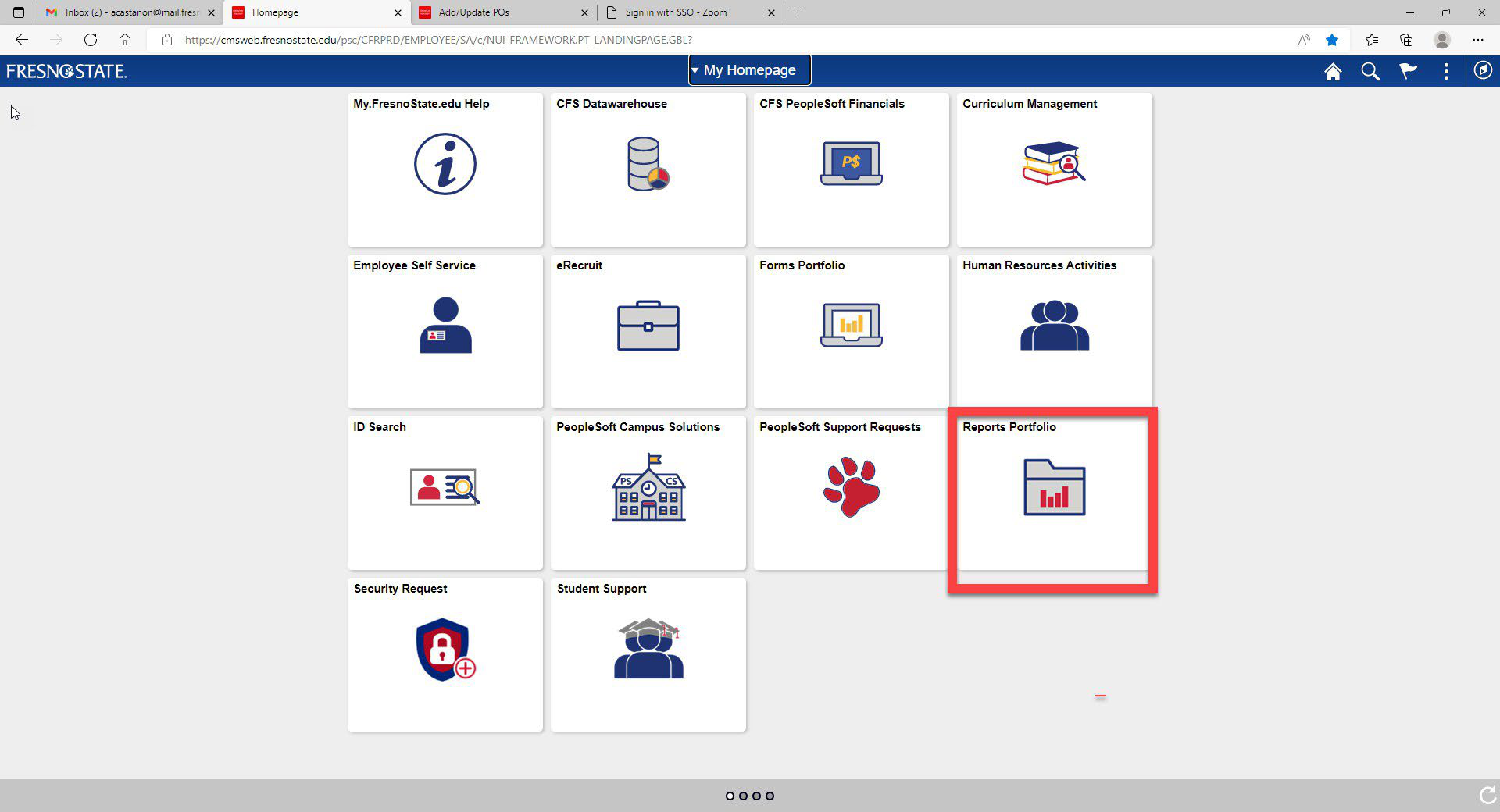
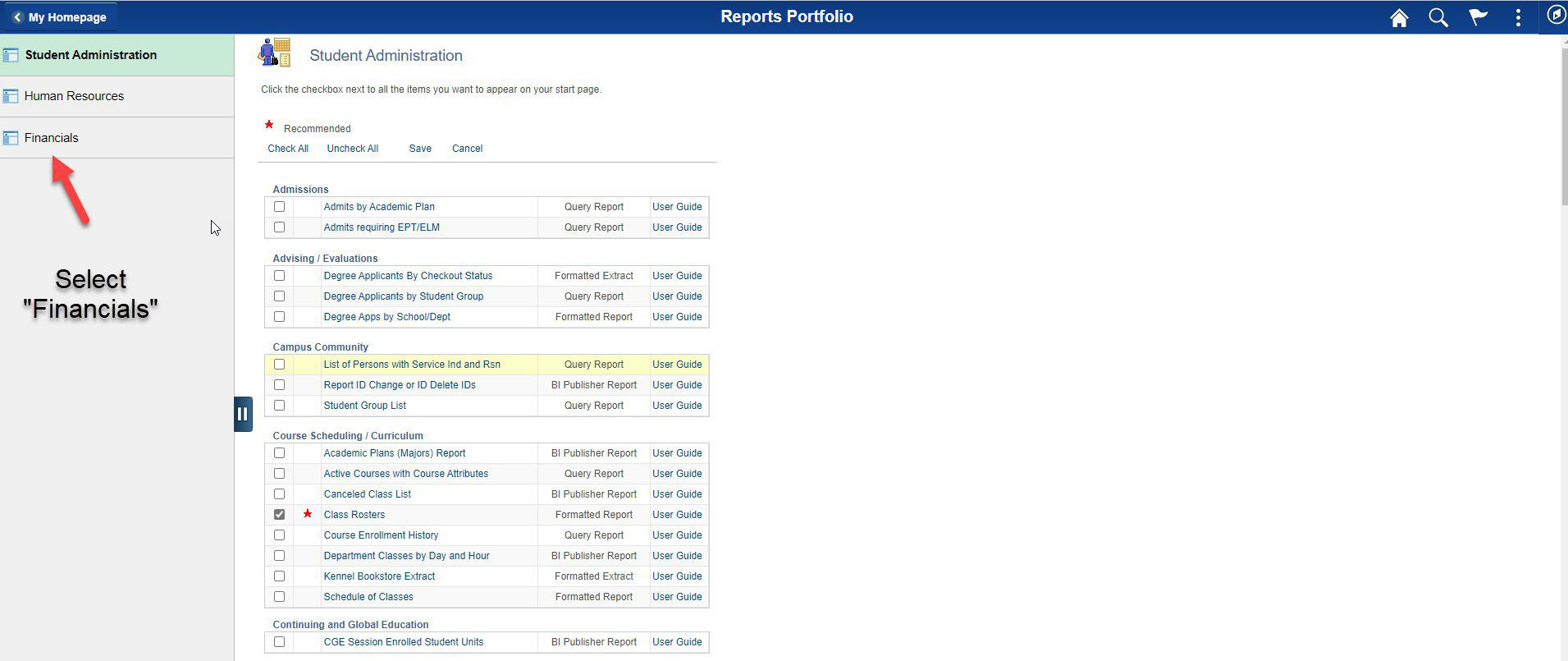
PEOPLESOFT NAVIGATION
https://www.fresnostate.edu
My Fresno State > Reports Portfolio > Financials > Purchase Orders > CFS ProCard Adjustment
TABLE OF CONTENTS
- Procurement Card Information — 5
- Why Should I have a Procurement Card? — 5
- Can I Use the Procurement Card For All My Purchases — 5
- Procurement Card Prohibited List — 6
- Procurement Card Allowable Services — 7
- Consequences for Misuse of the Procard — 7
- Obtaining A Procurement Card? — 8
- Applying for a Procurement Credit Card — 8
- Program Training — 8
- Card Activation — 8
- Card Chartfield Defaults — 9
- Card Holders Responsibilities — 9
- Security of the Card — 9
- Making a Commodity Purchase — 10
- Sales/Use Tax — 10
- Receiving the Shipment — 10
- Card Disputes — 11
- Returns and Credits — 11
- Procurement Card Receipt/Invoice — 11
- Raising Card Single & Monthly Spending Limits — 12
- Replacing Lost, Damaged, Stolen Cards — 12
- Changes In Cardholder Employment — 12
- Approver Responsibilities — 13
- US Bank Website — 14
- Peoplesoft Procard Module — 15
- Peoplesoft Procard Module Logon Instructions — 15
- Procard Module Access for Non–Cardholders — 19
- Procard Adjustment Panel — 20
- Procard Completed Inquiry Panel — 21
- Monthly Reconciliation Process — 22
- Monthly Reconciliation of ProCard Transactions — 23
- Changing Transactions Description and Distribution — 24
- Splitting Transaction Distributions — 27
- Printing Procard Statement — 29
- Monthly Processing Guidelines — 34
- Forms
- US Bank Procard Application — 35
- Procard Lost Receipt Memo — 36
- Updated Procard Approver — 37
Procurement Card General Information
Why have a Procurement Card?
Fresno State uses a variety of methods to purchase goods and services. Our current methods are purchase orders, Procards, and direct pay expenses. Processing purchase orders is not cost effective for low–dollar value goods and occasionally suppliers refuse to accept a purchase order.
The Procurement Credit Card (also known as a Procard and Pcard) is an additional option for purchasing supplies (goods), and allowable services costing $5,000 (including tax and shipping) or less, which are not restricted or prohibited. Cardholders are encouraged to use the ProCard for low value purchase in order to achieve cost savings and improve processing time for such items. The ProCard is for authorized University purchases only and is not for personal use. ProCard purchases must be shipped to the campus warehouse or another campus address for all purchases (2671 E Barstow Ave, Fresno, Ca 93740–8007) unless preapproval is given by the Procurement Department.
Can I use the Procurement Card for all of my Purchases?
The card may NOT be used to purchase everything. Some items and services are restricted by State law or University policy. Normally prohibited purchases include items within the following categories:
- Hospitality: Food, beverages, eating utensils, plates, catering, promotional products, gifts, etc. Hospitality items on the next page with an “*” may be purchased on the ProCard, only if preapproval for the Hospitality related expense is obtained by the AVP Financial Services (John Fugatt). Approval is via the old Hospitality Justification form and should be attached to the Monthly ProCard Reconciliation. Hospitality Justification Form can be found here. A Food Waiver is required whenever catering/food will be provided on campus by a third party.
- Travel: Lodging, auto rental, air travel, entertainment, etc (Contact Cynthia Hanks for information on the University’s travel corporate card).
- Service: Service/Maintenance agreements, repairs (onsite), leases, consulting, etc.
- Personal: Awards, certificates, flowers, gifts, artwork, office decorations, etc. (see Hospitality notes above).
- Capital Equipment and Sensitive Equipment
- IT Related Products (Software and Computer equipment – laptop, desktop, tablet, printers, monitors, IT related maintenance agreements, and etc.) unless given written permission to purchase with Procard by the Procurement Department. In rare instances where software/web access needs to be purchased on the ProCard, first submit an ACID form, once Technology Services approves the ACID form, then Procurement will let you know to proceed with the purchase on the ProCard. CSU Policy requires that all software/web access go through an IT Review process before purchase. The ACID form information can be found here. Software/web access purchases submit through CSUBUY on the IT Software Form will go through all of the necessary IT Reviews and ordered on a Purchase Order.
Prohibited Uses of Procurement Card
The card may NOT be used to purchase everything. Some items and services are restricted by State law or University policy. Hospitality items below are marked with an asterisk (*), see Hospitality notes on previous page. The following is a representative list of prohibited uses of the ProCard. It is not intended to be all–inclusive. If you are not sure your purchase is allowed, please contact the ProCard Administrator before you acquire any product.
| Prohibited purchase | Prohibited purchase |
|---|---|
| Airline Tickets | Hotels, Motels & other Lodging Expenses |
| Alcoholic Beverages | In Lieu of Supplemental Wages |
| Ammunition/Firearms | Leases and maintenance agreements |
| Animals and Animal Related Products | Meals, Travel or Entertainment Expenses |
| Automotive Gasoline and Oil | Office Decorations* |
| Awards, plaques, certificates, flowers, gifts* | Party Favors* |
| Bottled Water* (if given approval, Aquafina should be purchased) | Personal Items/Purchases |
| Capital Equipment1 | Promotional Items (Use Print Shop) |
| Car Washes (excludes Police Vehicles) | Purchases resulting in personal gain |
| Car Rental | Postage and Postage Stamps - Use mail services (after hours okay) |
| Cash Advances, Cash Refunds | Prescription Drugs |
| Catering Services* (Need Hospitality Justification form & Catering Waiver) | Public Work Projects |
| Cellular Phones and Service | Purchases that violate CSU or Fresno State policy or procedures |
| Computers & Computer Equipment | Radioactive/Hazardous Materials |
| Computer parts to build complete system | Rental Agreements |
| Conflict of interest | Restaurants* |
| Consulting Services, Instructors & Guest Speakers | Services and Service Agreements (Annual Maintenance Contracts) |
| Controlled Substances | Services not explicitly allowed |
| Food and Food Related Products & Services* | Software (see previous page) |
| Furniture | Splitting of purchases to circumvent daily/monthly spending limits or the $5,000–dollar limitation/bidding process |
| Gift Cards* | Uniforms |
| Hazardous Materials (exceptions can only be given by EH&S) | Vehicle Repair |
Cardholders may be given exceptions to purchase prohibited items on their Procard with an email written approval from the Procurement Department (attach email approval to Procard Statement). Procurement Department Buyers are excluded from the Procard Prohibited Items List when purchasing for campus customers.
1 Capital equipment – Real or personal property that has a unit acquisition cost equal to or greater than $5,000 including sales tax, and which has an estimated life of one year or greater, and can stand on its own (e.g. furniture, statue, vehicles or a combined component parts cost of $5000 or more. An example of component parts system is a mixing machine that has three parts that are $2000.00 each.
Procurement Card Allowable Services
- Approved Advertisements – Acceptable use would be candidate search advertisements in professional journals. Advertisements for promotional efforts are not allowed
- Subscriptions / Memberships – these charges are allowed, provided that an acceptable Justification that details the benefit of the University is stated in the transaction description box within the Procard Adjustment panel. In addition, for subscriptions your itemized receipt must also detail the number of publications per year. Software subscriptions are not included and are a prohibited Procard item.
- Professional Dues – These charges are allowable, provided that an acceptable justification that details the benefit to the University is stated in the transaction description box within the Procard Adjustment panel.
- Conference Registration Fees – Registration fees are allowed, but fees associated with being an exhibitor at a conference, i.e. booth rental, electricity, carpet rental etc. are not allowed.
All requests for changes to any spending limits whether temporary or permanent will be printed and filed with the cardholders Procard file.
Consequences for misuse of the Procurement Card
- Revocation of the Card and/or temporary decrease of limit to $1. If reduced to $1, then the limit may not be increased again until the following monthly statement is submitted complete and on time.
- Disciplinary steps that may include termination and legal action
- Inadvertent Personal Purchases must be reimbursed with the Cashier’s Office in Joyal Administration. Cardholder will need to reach out and notify Eva Owens in Accounting before going to the Cashier’s Office.
- USE OF THE PROCARD IS SUBJECT TO REVIEW BY THE CAMPUS, CSU OR STATE AUDITOR AT ANY TIME!
Conflict of Interest (COI) – see the Conflict of Interest Handbook for an explanation of what items are considered to be Conflict of Interest:
Obtaining a Procurement Card
Applying for a Procurement Card
- Complete a Procard application, available on our website: https://adminfinance.fresnostate.edu/procurement/purchasing/ways/procard.html
- Designate an Approving Official and an Alternate Approving Official. An Approving Official will review and authorize the cardholder’s charges each month and should be at least one level about the cardholder. Cardholders cannot approve their own charges. The Approving Official should have a signature authority card on file with the Procurement Office.
- Determine spending limits. Generally, the cardholder’s Approving Official or Department Budget Analyst will determine the spending limits for a cardholder. Spending limits should be set to accommodate your department needs and can be raised later if needed. The single item (what can be spent at one time with one merchant) is set to a maximum of $5,000 per a transaction for all cardholders (without approval by Procurement Director.)
- Signatures. The application should have the signatures of the cardholder, the Approving Official, and an Alternate Approver.
Program Training
When your card arrives, you will be contacted for a short training session and delivery
of your card. The training session is mandatory for all cardholders. The U.S. Bank
Procard Handbook is available for download on our website at the following location:
https://adminfinance.fresnostate.edu/procurement/purchasing/ways/procard.html
Card Activation
To activate your card, call the customer service phone number shown on your card (1–800–344–5696). Using your telephone keypad, enter your account zip code (93740 for most cardholders.)
- Select “1” to activate your account
- Enter the last four numbers of your employee ID number, then press the “#” key
- Enter your preferred business telephone number that is on your procard application
- Sign the back of your procurement card
Card Defaults (Chartfields)
Your credit card transactions will automatically default to the chartfield string specified on your Procurement Card application. After each month’s processing cycle ends, you will be given five (5) business days to change the chartfields on the transactions not yet posted to the General Ledger. Contact the Procurement Card Administrator if you need a permanent change made to your default chartfield string.
Cardholder Responsibilities
Cardholders are responsible for ensuring the Procurement Credit Card is used in accordance with the policies outlines in this manual and that all purchases are in compliance with CSU procurement and contracting procedures and policies, including but not limited to:
- Comply with all CSU Procurement Procedures for the purchase of Commodities, Services,
or Information Technology Acquisitions as described in the ICSUAM Section 5000 Contracts
and Procurement
http://calstate.edu/csp/crl/policy/policy07–07–096.doc - Make purchases that are reasonable, appropriate, and cost effective
- Obtain the best possible price for the merchandise purchased
- Verify and certify that all purchases listed on their bank statements are correct and made for official purposes which meet the business needs of the University
- Notify the Procard Administrator when their Approving Officer leaves or changes departments (See Update Procard Approver Form).
- Return the Procard to the Procard Administrator upon leaving the department or terminating employment with the University
Security of Procurement Card
You are responsible for ensuring the card is kept in a secure location. If kept in your office, the card should be kept out of sight, and preferably put in a place that can be locked during the evening. The cardholder is the only person that is authorized to use the card. Do NOT lend your card to others to use. If you are going to be absent for an extended length of time, please notify the Procard Administrator so that your card can be reduced to $1 and no charges will occur during your absence. The department should request that a new card be issued to a different person for the duration. It takes approximately five to seven (5–7) working days to issue a new card, so plan ahead.
Making a Commodity Purchase
You may go to the place of business to obtain the commodity, place the order over the phone, or order via the Internet. In all cases, you will need an itemized receipt/invoice. An itemized/receipt consists of the following information:
- Description of commodities purchased
- Quantity purchased
- Price per item
- Amount of sales tax and total amount
- Shipping charges, if applicable
- Name of vendor
If ordered via the Internet, provide the supplier with your name, card number, expiration date, department name, building and room number, and mailstop. If merchandise is to be shipped, the supplier must incorporate this information on the shipping label and ship to University Warehouse, 2671 E. Barstow Ave., Fresno, CA 93740–8007.
Before you finalize placing the order, check one last time to make sure all the information is correct. Make sure the appropriate department administrator is aware of your purchase and that you have followed all campus and departmental procedures regarding order processing and records retention.
Sales/Use Tax
The University is NOT exempt from paying California Sales Tax. Some out–of–state suppliers do not charge California State Sales Tax. It’s the University’s responsibility to remit use–tax (when applicable) and remit the use tax directly to the State Board of Equalization for our purchases. The Accounting department will accrue and remit use taxes for any transactions for which the University did not pay the appropriate sales tax, and these charges will be added to the payment voucher or appear in a future expense journal entry.
Receiving the Shipment
Cardholders are responsible for promptly and properly inspecting shipments when they arrive. In the case of returns, damages, etc., the cardholder is responsible for contacting the vendor and coordinating the problem resolution.
Card Disputes
In case of an exception or disputed charge, the Cardholder should first contact the supplier. Most exceptions or issues can be resolved at this level. When the vendor corrects the problem, you should see the correction on your next monthly statement. If you cannot reach an agreement with the supplier, the next step is to dispute the charge by calling U.S. Bank Customer Service at 800–344–5696. It is important to document all the steps taken to try to resolve the disputed charge, and to retain all relevant documentation to ensure proper resolution during the dispute process.
- If items purchased with the Procurement Card are received defective, you are responsible for returning the item(s) to the merchant for replacement or for receiving a credit on the purchase. If the merchant refuses to replace the defective item, then you must contact U.S. Bank Customer Service and dispute the transaction and note that charge was disputed on the PeopleSoft Procard adjustment screen.
- IMPORTANT: Failure to take immediate and appropriate action could result in a loss for the University, disciplinary action against the Cardholder and cancellation of their Procard.
Returns and Credits
- Returns: Returns should be made directly to the vendor according to the vendor requirements. Determine if the supplier will pick up the item, issue a “Call Tag”, or if it is necessary for you to return it to the supplier.
- Credits: The supplier should issue a credit for any item that has been discussed and agreed upon for return. It is the cardholder’s responsibility for ensuring that the proper credit is posted for any returned items. This credit will appear on a subsequent statement.
Procurement Credit Card Receipt/Invoice
- Whether the purchase is made by telephone, in person, or via the web, you will need an itemized receipt or invoice.
- If you have lost receipts/invoices, and a duplicate copy cannot be obtained from the
vendor, attach a “ProCard Lost Receipt Memo” form available for download from the
Procurement website at:
http://fresnostate.edu/adminserv/purchasing/purchasing/ways/procard.html - NOTE: Your ProCard may be revoked if there are excessive instances of lost receipts.
- Procard receipts must be kept until the transaction(s) show up on the bank statement. Receipts & any other approvals & documentation should be placed behind Cardholder’s ProCard Statement in one pdf file in the same order as the transactions on the Procard statement. Number the receipts & documentation to match the number of the charge on the ProCard statement. Procard Statement & receipts should then be submitted through AdobeSign for all signatures & sent to Eva Owens in Accounting (eowens@mail.fresnostate.edu)
Raising Card Spending Limits for Monthly or Single Credit Limit
Monthly / Single Credit Limit – Your ProCard has a Monthly & Single Credit Limit. If you reach your Monthly limit before the end of the month and try using your card, the transaction will be rejected by the merchant. If you exceed the Single Limit, the transaction will also be rejected by the merchant. Splitting the purchase of the merchandise in order to circumvent the Single Transaction is explicitly prohibited. To permanently or temporarily change either monthly or single limit, the card holder must email their Approving Official and copy the ProCard Administrator, Kevin Taloza, ktaloza@mail.fresnostate.edu on the email. Once the Approving official approves the increase by responding to the group email, the Campus Procard Administrator will go into US Bank to complete the changes. The Procard Administrator will also notify the group on the email that the changes have been made and that you can proceed with your transaction.
Replacing Lost and/or Damaged Cards
You, as the cardholder, are responsible for initiating the process to replace your ProCard when it becomes necessary because the card has become worn/defective, stolen, lost or compromised.
- Immediately contact US Bank at (800–344–5696)
- Also notify the Campus ProCard Administrator, Kevin Taloza, ktaloza@mail.fresnostate.edu
When your ProCard is reported lost or stolen, a new card will automatically be issued. If you receive a Fraud form from US Bank please make sure you fill out this form and save a copy to attach to your Procard statement. Replacement cards will be mailed to the Procurement Office. The Campus ProCard Administrator will notify the cardholder when the replacement card is available for pickup.
Changes in Cardholder Employment
When a cardholder transfers to another department, they must turn in their ProCard to the Campus ProCard Administrator.
When a cardholder leaves the University, the PeopleSoft Workflow module will notify the campus ProCard Administrator, who will close the cardholder’s ProCard account (approximately one week prior to the expected severance date). The cardholder must submit all outstanding paperwork to Accounts Payable before separating from the University. If separation occurs during an open statement cycle, then the procard holder must contact the Procard Administrator for a copy of their procard activity report to submit to A/P along with supporting receipts.
Approver Responsibilities
On an ongoing basis:
- Be familiar with the nature and intended purpose of all purchases made by cardholders; ensure sending of complete, accurate, and timely documentation for all purchases to the Accounts Payable Department.
- Ensure retention of all documentation submitted to Accounts Payable Department.
- Ensure that only necessary products are purchased.
- Ensure purchase are reasonable, appropriate and cost effective.
- Ensure no prohibited items have been purchased (e.g., computer, equipment, etc.)
- Enhance oversight by performing and documenting periodic or surprise reviews of the cardholders ProCard usage.
- Stay current regarding acceptable and prohibited ProCard usage practices.
On a monthly basis:
- Review cardholders monthly ProCard Reconciliation Statement to ensure that all purchases were appropriate, especially take care to ensure that all invoices and receipts are attached, and that the report accurately details for each transaction made during the month:
- The business purpose and how the item(s) were used
- Where items were used or deployed; and
- What benefit was provided to the University
- If approved, sign and date the ProCard Monthly Reconciliation Statement
- Ensure that all required paperwork is received by the Accounts Payable Department, to include all receipts and authorized signatures by the fifth business day after the monthly cycle closes. Incomplete or inaccurate paperwork submitted to the Accounts Payable Department will be considered to have been received late and will be tracked for the purpose of possibly taking remedial action including suspension or revocation of the ProCard usage.
- An Approving Official cannot approve his/her own purchases, nor can the cardholder’s subordinate or peer.
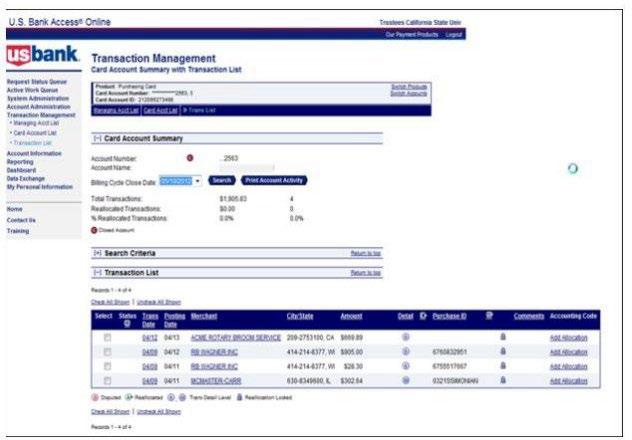
ACCESS TO US BANK
US Banks provides an online system which allow cardholders to view information for their credit card transaction. Contact your campus Procard Administrator, Antoinette Castanon, if you need access to this website.
PEOPLESOFT PROCARD MODULE
Logon Instructions for Cardholders (Pathway 1)
- Log into: My.FresnoState.edu (Make sure your internet browser has “popup blocker” set to off.
- Click on PeopleSoft Financials
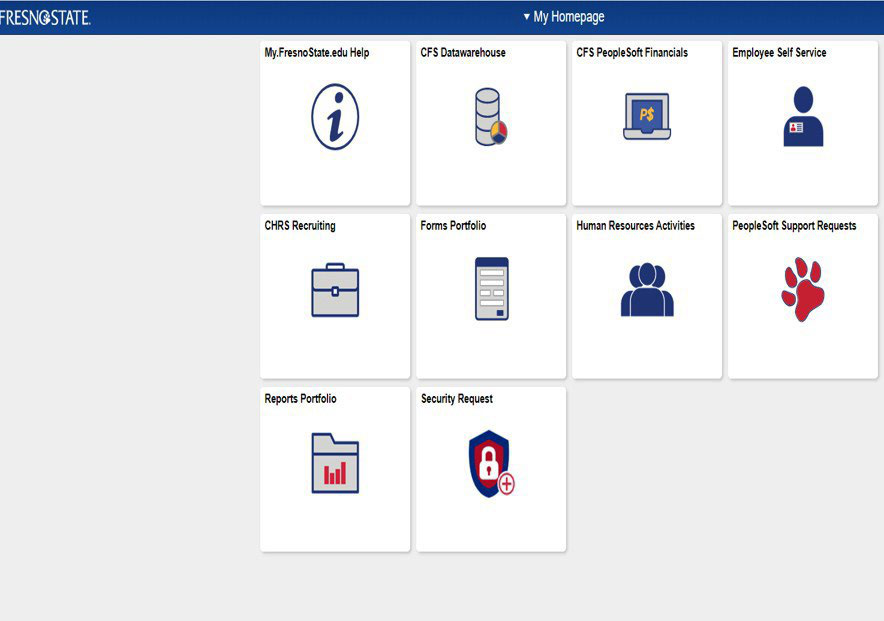
- If your internet browser’s pop up blocker is turned on the Oracle panel will envelop your entire screen and you will not be able to view the menu of reports in Reports Portfolio. You will need to turn off your pop up blocker, close the internet browser, and login to My.Fresnostate.edu again.
- If your internet browser’s pop up blocker is turned off the Oracle panel should appear small (as shown below). Click anywhere on the panel showing beneath the Oracle window.
- Under the Purchase Order Report List click on the CFS ProCard Adjustment link, or the CFS ProCard Completed Inquiry link
- Click on the Purchasing tile
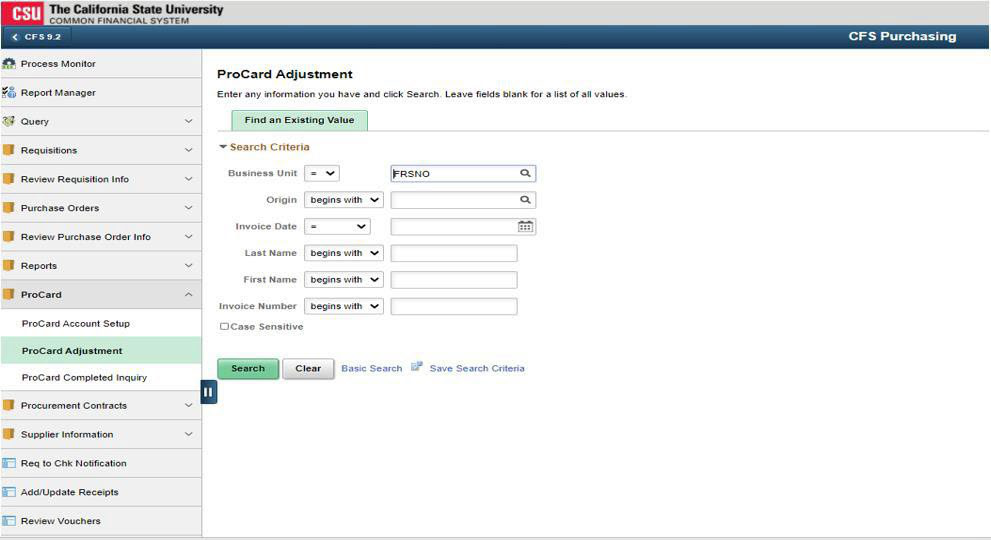
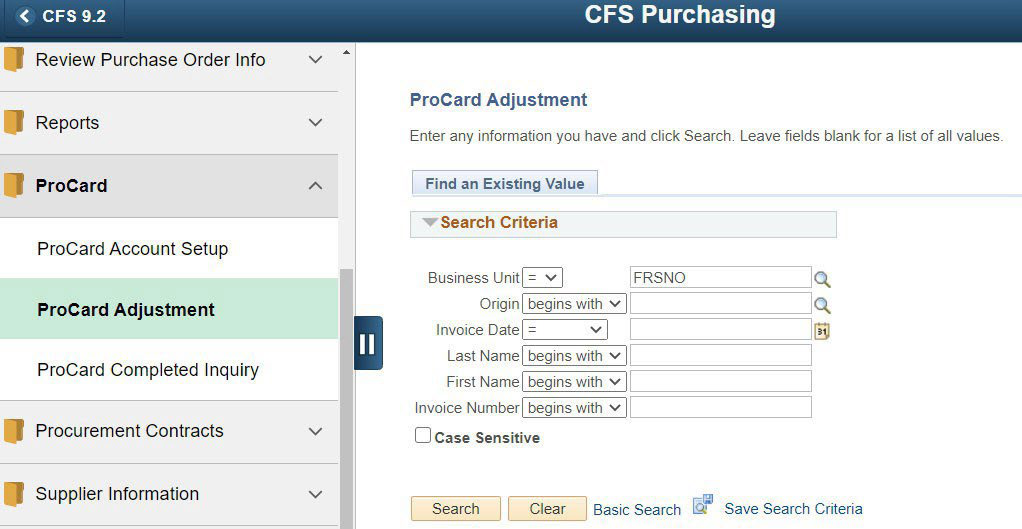
- Click on the left side of the menu Procard. Then click Procard Adjustment. Use the
Procard Adjustment Screen for current month transactions:
- Change Chartfields
- Change the item description and enter the business purpose of the purchase
- Print the Cardholder Statement
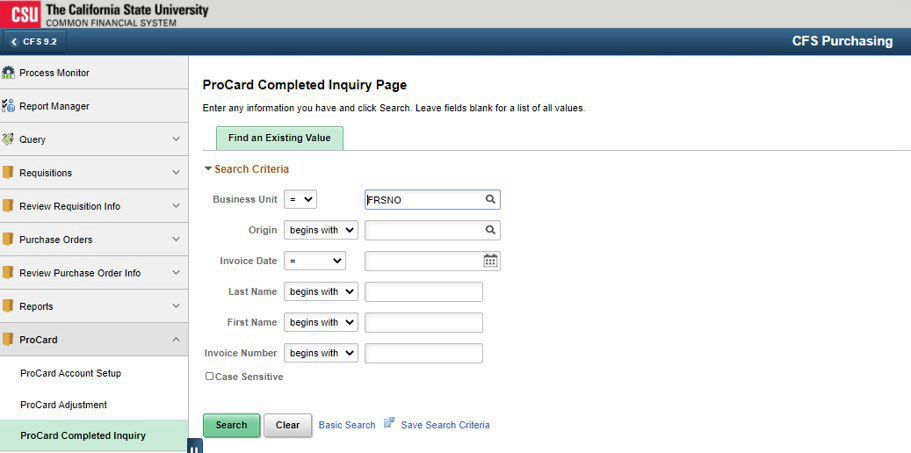
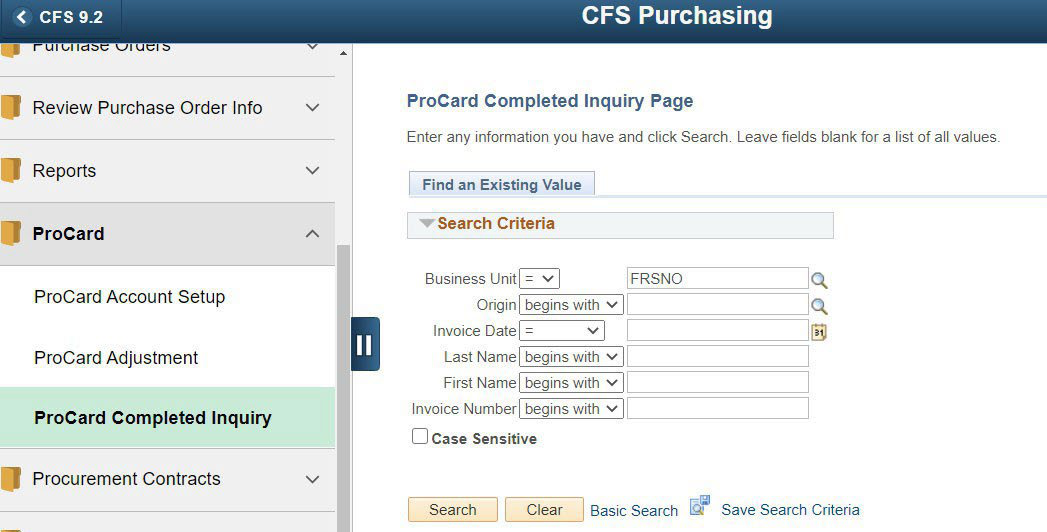
- Click on the left side of the menu Procard Completed Inquiry. Use the Procard Completed
Inquiry Screen to view prior month transactions:
- View transactions
- Print Cardholder’s Statement
PEOPLESOFT PROCARD MODULE
Logon Instructions for Cardholders (Pathway 2)
Access To The ProCard Module For Non Cardholders Non–cardholders, such as administrative staff, who assist with the monthly reconciliation of procurement card transactions may be granted access to the ProCard module for:
- Review of transactions
- Chartfield adjustments
- Printing Reports
To apply for access to the ProCard Module:
- Contact the Procurement Card Program Administrator at 278–2111.
- For instructions on submitting a PeopleSoft security request you may access Procurement
and Support Services’ website at:
http://www.fresnostate.edu/purchasing/purchasing/ways/procard.shtml
ProCard Adjustment Panel
The ProCard Adjustment Panel is used during the 5–Business day period immediately following the end of the monthly procurement cycle (5 business days approximately following the 25th)
Using this panel, cardholders may:
- Change chartfields
- Change the item description and enter the business purpose of the purchase
- Print the Cardholder Statement
ProCard Completed Inquiry Panel
The ProCard completed Inquiry Panel is used to view transactions from previous processing cycles.
Using this panel, cardholders may:
- View prior transactions detail, grouped by invoice month
- Vendor
- Chartfields
- Item Descriptions
- Transaction amounts
- Print the Cardholders Statement
MONTHLY RECONCILIATION PROCESS
Approving Transactions in the PeopleSoft ProCard Module
Credit card transactions are posted to the US Bank online account throughout the month. Once a month, (on or around the 25th of the month) Accounts Payable downloads these transactions from the US Bank website into PeopleSoft. After the download is completed cardholders are notified by email that their monthly statement is available for reconciliation. Here is an example of the email sent to the Procard Listserv:
ProCard End of Cycle Reminder - Due by 11/01/2022 - Accounting Services
Greetings,
*If any purchases are related to COVID-19 on their Procard statement, the class code must be changed to COV19.
This email is a reminder that the US Bank Procurement Card cycle ending October 25th has closed. If you had transactions during the month, you have just five business days available to adjust your transaction information in PeopleSoft. Please keep the following in mind as you process your paperwork, also make sure to provide itemized receipts. If you have not made any purchases during this billing period, we ask that you still check Peoplesoft due to fraudulent charges that may occur.
Log onto your “My Fresno State” account at: https://my.fresnostate.edu
Access CFS ProCard Module Adjustment Screen by 11/01/22
- Navigation: Reports Portfolio > Financials > Purchase Orders > CFS ProCard Adjustment.
- A small Oracle login panel may appear. Ignore it. Click on the Reports Portfolio panel below it. If, however, you are unable to logon because a full-screen Oracle logon panel appears you will need to log out of My Fresno State. Turn off your Internet browser’s popup blocker and try logging in to My Fresno State again.
Audit Posted Transactions on ProCard Adjustment Screen
- Compare your receipts to the transactions posted.
- Add a description of the purchase and its business purpose.
- Adjust chartfields if required.
Print Cardholder ProCard Statement
- To print ProCard Statement see ProCard Manual for instructions.
- Both you and your authorized approver must sign the report.
Attach Receipts
- Include your original receipts with your ProCard Statement.
- Please number the receipts to correspond with the line number on your ProCard Statement.
Email paperwork to Eva Owens in Accounts Payable by 11/01/22
- ProCard Statement (signed by you and your approver)
- Receipts
- Paperwork should be emailed or sent via AdobeSign within 5 business days of the cycle close date.
Paperwork should be sent to the attention of Eva Owens at eowens@mail.fresnostate.edu.
Thank you,
Cynthia

Monthly Reconciliation of Procurement Card Transactions
- Log into “My Fresno State”
- Navigation: Reports > Financials > Purchase Orders > CFS ProCard Adjustment
- Select Business Unit or either FRSNO (default) or FRATH (for athletics)
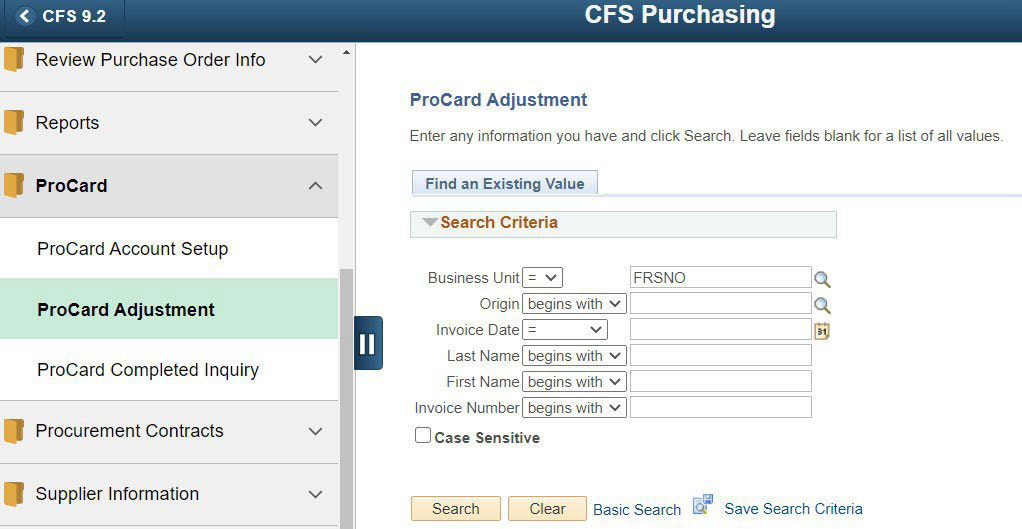
- Enter Cardholder’s last name
- Click on “Search”
Monthly Reconciliation of Procurement Card Transactions (Cont’d)
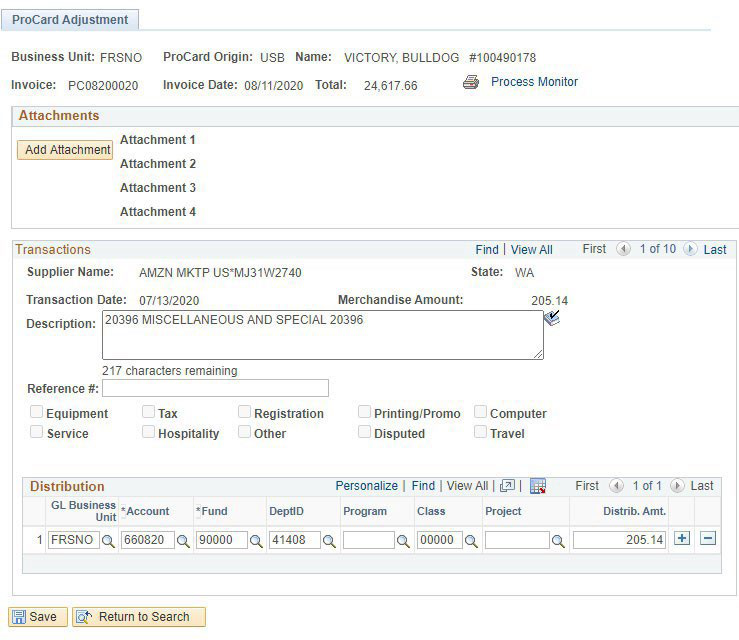
- Invoice#: System generated. The first two characters are PC, the next four characters are MMYY (the month and year of the billing statement), and the last 4 are sequential numbers.
- Invoice Date: The billing statement date
- Description: Default description based upon vendor’s MCC (merchant category code)
- Distribution: These fields are automatically populated with cardholder’s default chartfield string.
Monthly Reconciliation of Procurement Card Transactions (Cont’d)
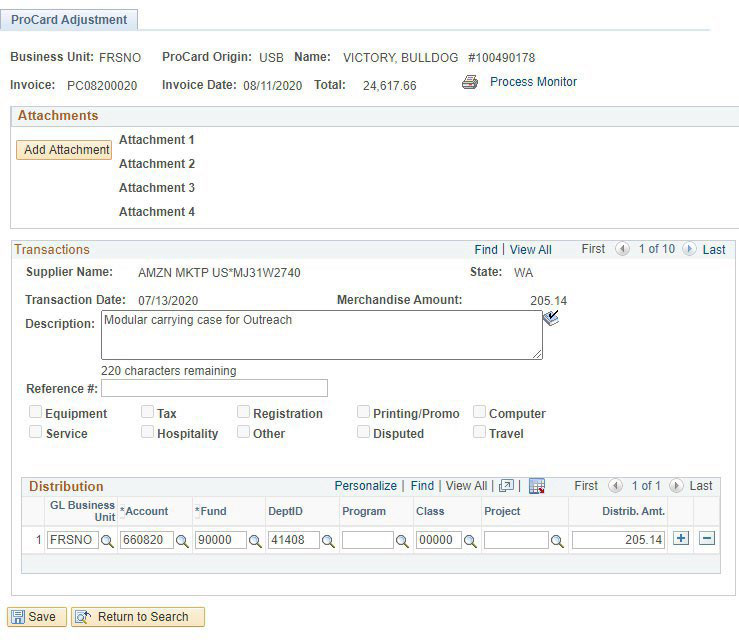
- Description: Delete default description and enter a brief description of the item purchased and its business purpose.
- Distribution: If required, change chartfields here. Click on magnifying glass to view additional chartfield selection.
Monthly Reconciliation of Procurement Card Transactions (Cont’d)
- To see the next transaction, click on the icon button. To see all charges for the billing cycle select “View All”
If you are adjusting multiple transactions please remember to click on
At the bottom of the transaction page so that your changes are retained.
Monthly Reconciliation of Procurement Card Transactions (Cont’d)
Split Distributions
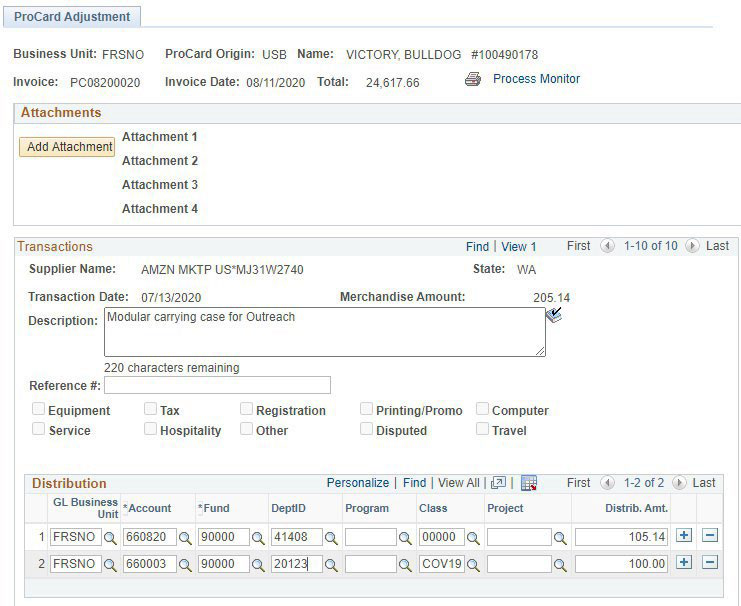
To split the distribution on a transaction, click on “View All” on the Distribution line, then click on the “+” at the end of the chartstring row to insert a new distribution row. Add the chartfields for the second distribution. You may split a transaction up to 9 lines.
When you are finished, select “Save”.
Monthly Reconciliation of Procurement Card Transactions (Cont’d)
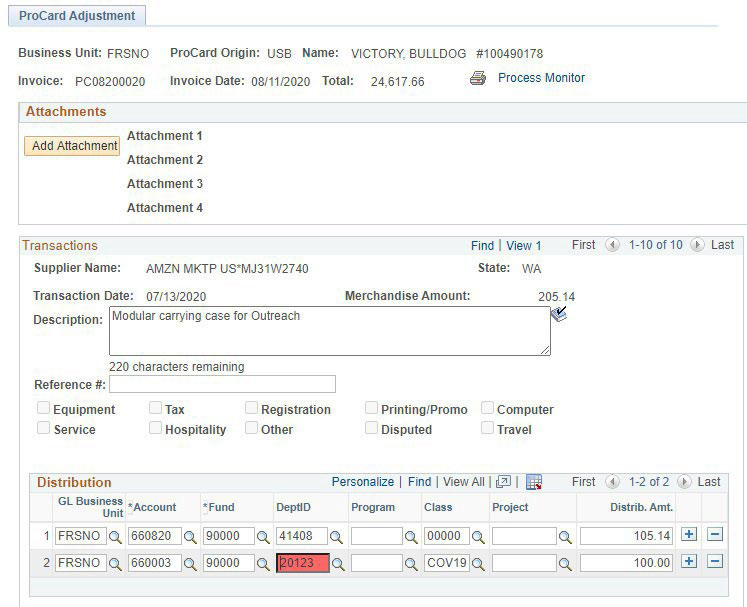
When you click on “Save” the PeopleSoft system automatically checks for the following:
- The total Distribution Amount must equal the Merchandise Amount.
- The transaction must have valid chartfield combinations. The PeopleSoft system will permit you to save the transaction until the distribution amounts and chartfields are valid.
Printing Procurement Card Statements
When you are finished making adjustments to your procurement card transactions, you will need to print your ProCard Statement.
The ProCard Statement may be printed from the ProCard Adjustment panel or the ProCard Completed Inquiry panel.
To print the statement first click on the printer icon on the upper right corner of the ProCard Adjustment panel, then click on “Process Monitor” located next to the printer icon.
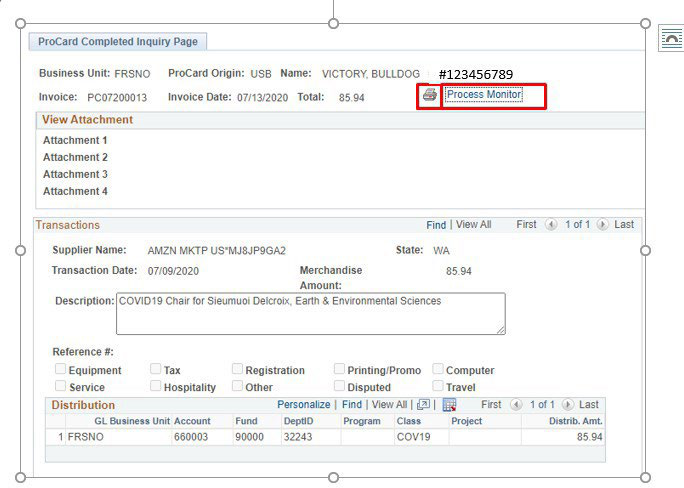
Printing Procurement Card Statements (Cont’d)
Click on the yellow refresh button until the Run Status changes to “Success” and the Distribution Status is “Posted”.
Click on the Details Link
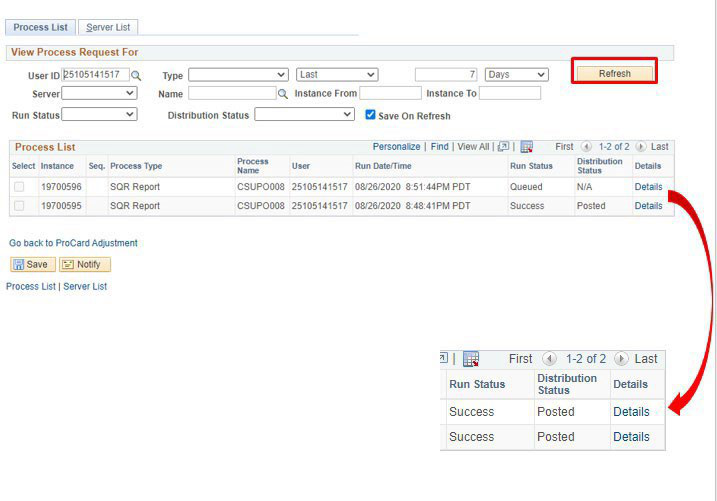
Printing Procurement Card Statements (Cont’d)
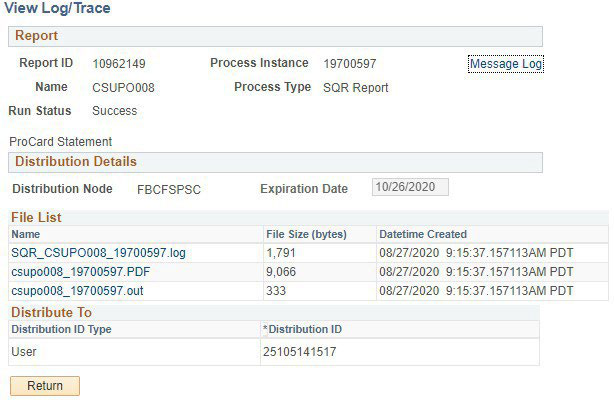
Click on the View Log/Trace link
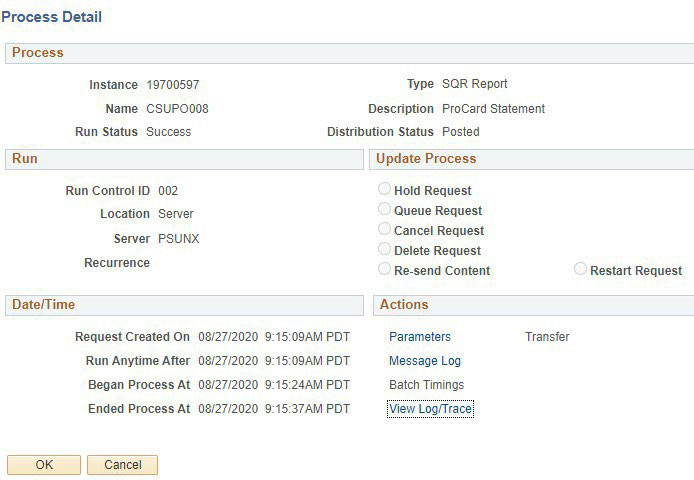
Printing Procurement Card Statements (Cont’d)
Click on the PDF Link
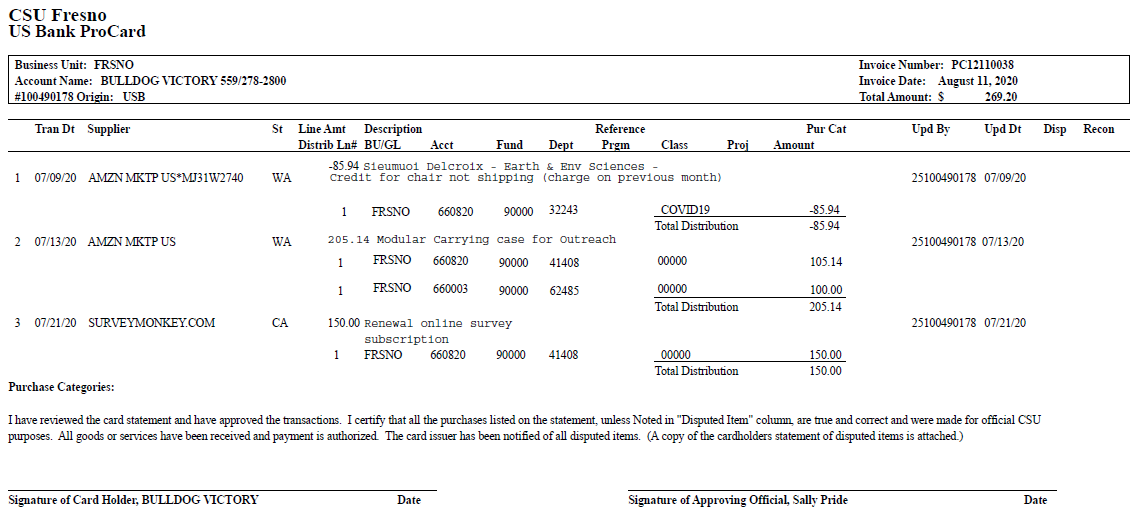
Print the ProCard Statement
Sample ProCard Statement
Monthly Processing Guidelines
Both the Cardholder and Approving Official must sign the ProCard Statement.
- If your Approving Official is unavailable to review and approve your purchases you are responsible for contacting your designated Alternate Approver to review and approve your purchases.
- If your paperwork is late any three times in a 12–month period, your card maybe temporarily suspended or the limits reduced. If your paperwork submissions to Accounts Payable continue to be late, your Procurement Credit Card maybe revoked.
- Please number the receipts/invoices to correspond with the line number on your ProCard Statement.
- Individual receipts/invoices smaller than 4 ¼” x 5 ½” should be taped to an 8 ½” x 11” sheet of paper to ensure they are not lost in transit.
- Email copy of the ProCard Statement with signatures and attached receipts to: Eva Owens at eowens@mail.fresnostate.edu. Send as attachment through email or through Adobe.
- When: By the 5th business day following the cycle end (@ 4th day of the month).
- Keep a copy of your US Bank ProCard Statement, and invoices/receipts for a minimum of 90 days (preferably 1 year).
Forms
Fresno State Procurement Card Application
| Field | Field |
|---|---|
| Date: | Name: |
| Email Address: | Employee Id: |
| Single Transaction Limit: | Monthly Credit Limit: |
As a cardholder, I agree to comply with the terms and conditions of this Agreement and the applicable provisions of the Procurement Card Manual (“Manual”), including revisions. I acknowledge receipt of the Manual, and confirm that I have read and understood its terms and conditions.
As the holder of a Procurement Card (“ProCard”), I agree to accept responsibility for the protection and proper use of it as outlined in this Application and the Manual. I understand that the University will audit the use of my Procurement Card. I understand that I cannot use the Procurement Card for the restricted commodities or prohibited uses as detailed within the ProCard Manual. I understand that commodities, where University Master Agreements are in place, must be purchased from the University’s contract suppliers.
I further understand that improper use of the ProCard may result in disciplinary action up to and including termination of employment. Should I fail to use the ProCard properly, I authorize the University to deduct from my salary an amount equal to the total of the discrepancy. I also agree to allow the University to collect any amounts owed by me, even if the University no longer employs me. If the University initiates legal proceedings to recover amounts owed by me under this Agreement, I agree to pay all legal fees included by the University in such proceedings. I understand the University may terminate my rights to use the ProCard at any time for any reason. I agree to return the ProCard to the University immediately upon request or upon termination of employment.
Cardholder’s Signature: ________________________________ Dept. Name: ________________________________
Dept. Street Address: __________________________________________ Mail Stop: ________________________________
City: __________________ State: __________ Zip Code: __________ Campus Phone: ________________________________
Cell Ph: ________________________________
Default PeopleSoft Chartfields: Account: __________ Fund: __________ Org: __________ Class: __________ Project: __________
I hereby certify that I have reviewed all requirements and related obligations that are required of me an Authorized Approver for the US Bank Procurement Card program as described in Section V of this Handbook, “Procedures – Approving Official.” By Signing below, I hereby agree to abide by all requirements of the US Bank Procurement Card program, and will ensure that I will stay current with Program requirements as disseminated by the Procurement and Support Services Department
I will be directed what to purchase or I will make decisions on my own of what to purchase
Initial ____________________________ Initial ____________________________
Approving Officer’s Name: ________________________________ Approver’s Email Address: ________________________________
Approver’s Signature: __________________________________________________________
Alternate Approver’s Name: ________________________________ Alternate Approvers Email: ________________________________
Alternate Approver’s Signature: __________________________________________________________
Internal Use Only
I have received in person training and Procard: __________________________________________ Date: __________________
Emailed signed application to: Kevin Taloza (taloza@mail.fresnostate.edu)
Questions? Contact Kevin Taloza, (559) 278–2111
ProCard Lost Receipt Memo
Cardholder Name: ________________________________ Work Phone: ________________________________
Vendor Street Address, City, State, Zip: _________________________________________________________________
Please accept this memo as evidence of purchase in lieu of the original receipt. I am aware that excessive instances of list receipts/invoices may result in my card being revoked.
Cardholder Signature ____________________________________ Date ____________________
Approving Official Update
Department Name: ________________________________ Date: ________________________________
Submitted by: ____________________________________ Phone #: ________________________________
Former Approving Official: ________________________________ Former Alternate Approver: ________________________________
Print Name: __________________________________________________________
Signature: __________________________________________________________
New Approving Official: ________________________________ New Alternate Approver: ________________________________
Print Name: __________________________________________________________
Email address: _______________________________________________________
Signature: __________________________________________________________
Cardholder(s) under New Approving Official:
| Cardholder | Cardholder |
|---|---|
| 1 | 5 |
| 2 | 6 |
| 3 | 7 |
| 4 | 8 |
EMAIL COMPLETED FORM TO:
Kevin Taloza (ktaloza@mail.fresnostate.edu)
This HTML version was generated with AI assistance and may contain errors or omissions. The original approved PDF remains the official document of record. An alternative accessible format is available upon request from the document creator in accordance with Title II of the ADA.