Proxy Instructions
If you are not going to be available to approve absence management for any pay period you will need to proxy your approval to another manager or department chair. The process for creating this proxy is as follows:
1) Log on to MyFresnoState
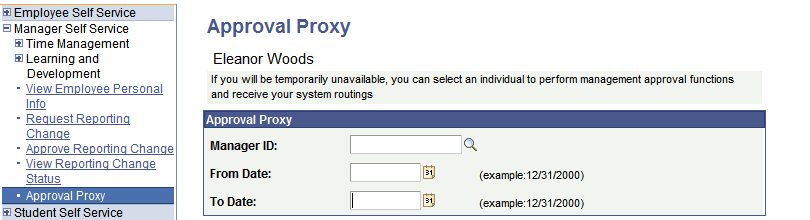
2) Click on Manager Self Service from the menu on the left side of your screen
3) Click on Approval Proxy
4) In the Approval Proxy box, enter the Empl ID number of the manager or department chair that you are designating as your proxy. Enter in a beginning and end date in the From Date and To Date fields. Click the save button.
a) You can use the magnifying glass to search and select the appropriate manager if you do not know their Empl ID number.
This HTML version was generated with AI assistance and may contain errors or omissions. The original approved PDF remains the official document of record. An alternative accessible format is available upon request from the document creator in accordance with Title II of the ADA.