PSP User Guide
User Registration
First you will register as an end user. This is a one time registration that uses your existing LDAP sign on - email address and password. Save this page to your favorites for easy access for future ordering. Contact Printing Services for the web address.
Not a Registered User - Click here to register
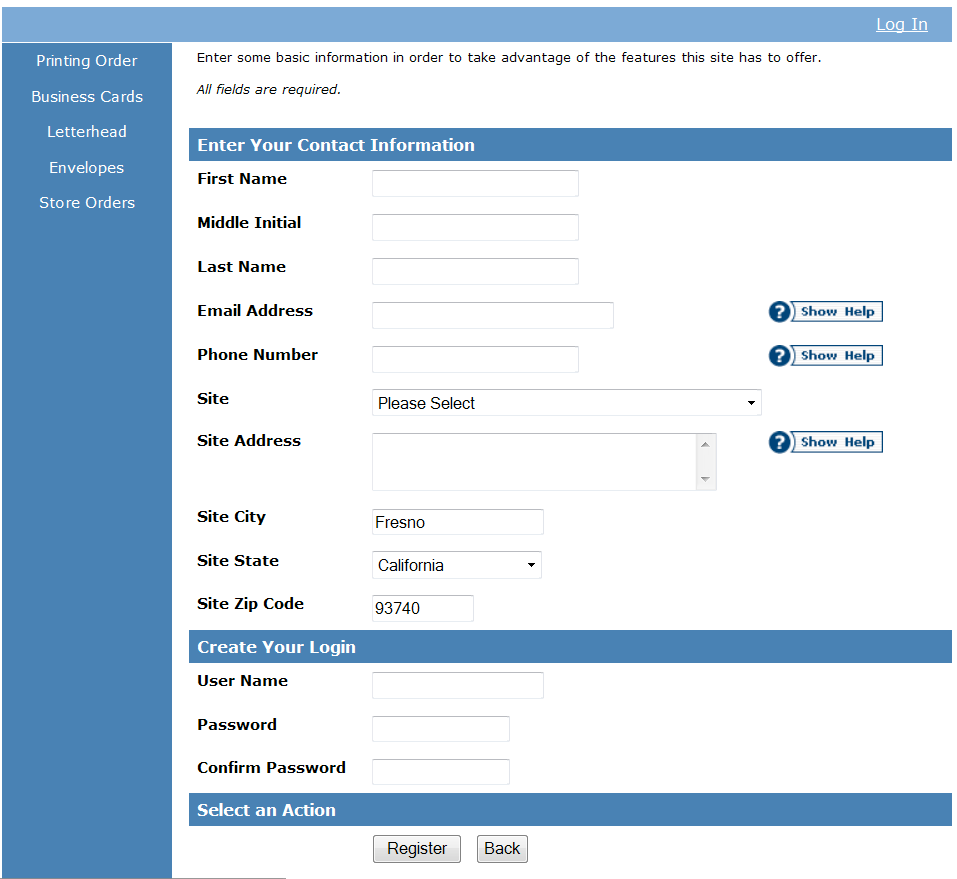
Enter your complete contact information completing all fields. Note - Middle initial field must contain at least your middle initial.
Site - Use the drop down menu to select your department. Please contact Printing Services if your department is not listed. Each user is assigned one default site but can have access to multiple sites and account numbers as in the case of using auxiliary funding.
User Name/Password – Same as campus email login.
Click – Register
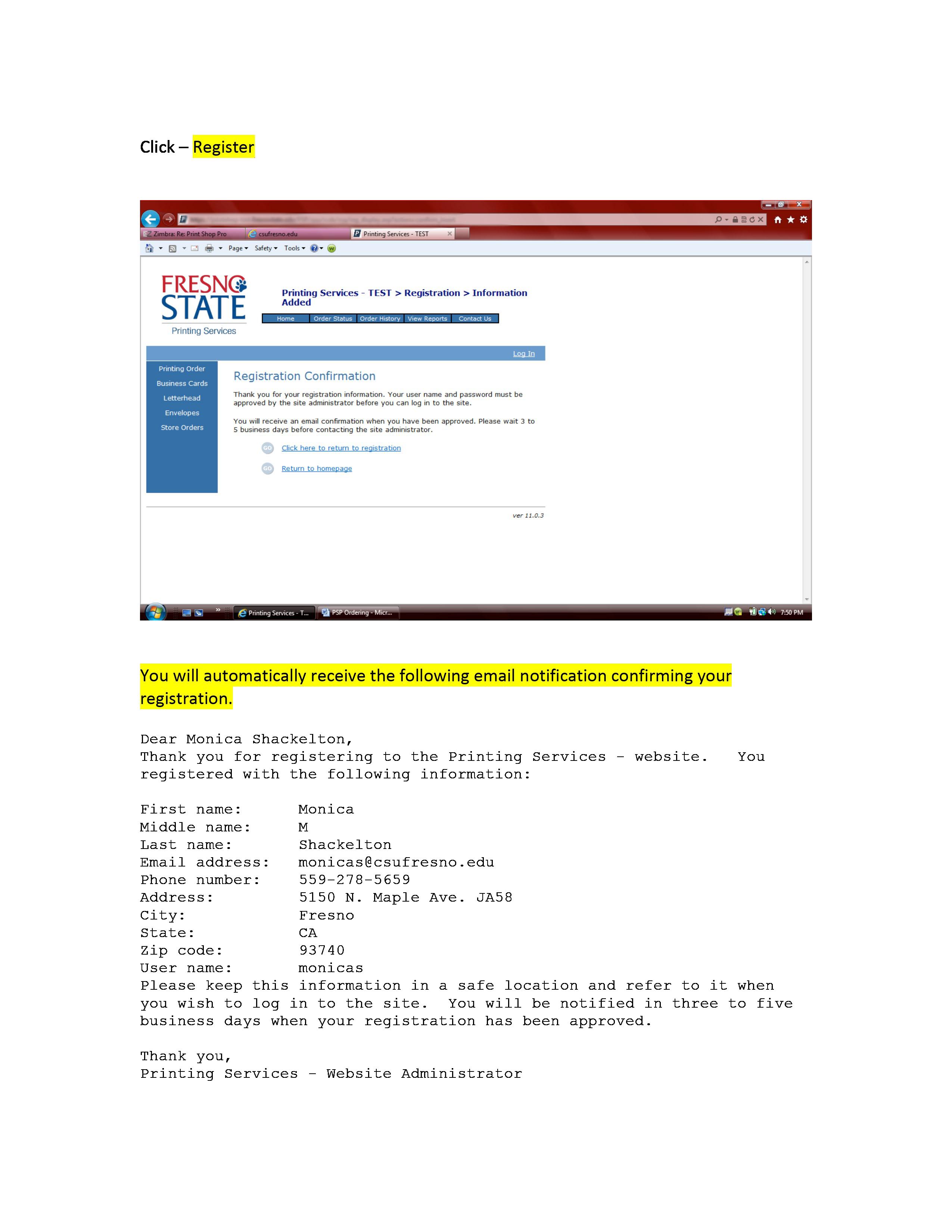
You will automatically receive the following email notification confirming your registration.
Dear Monica Shackelton,
Thank you for registering to the Printing Services - website. You registered with
the following information:
First name: Monica
Middle name: M
Last name: Shackelton
Email address: monicas@csufresno.edu
Phone number: 559-278-5659
Address: 5150 N. Maple Ave. JA58
City: Fresno
State: CA
Zip code: 93740
User name: monicas
Please keep this information in a safe location and refer to it when you wish to log in to the site. You will be notified in three to five business days when your registration has been approved.
Thank you,
Printing Services - Website Administrator
Once the Print Shop administrator has approved your registration you will receive the following email notification. You are now ready to start placing your print order.
Example below:
Dear Monica Shackelton,
Your registration for the Printing Services - website has been approved. When you
are ready to log in, please use the user name and password you supplied at registration.
If you do not see your account numbers when placing an order, please call us or reply to this email so that we can supply you with the appropriate account numbers.
Thank you,
Printing Services - Website Administrator
Once the user is registration completed and approved by the Printing Services Administrator the departmental approver will select the corresponding account number(s) that will be used when placing a print order for their department.
Account Number Approval
Your department approver will then authorize the corresponding account number(s) to each end user. Each account number assigned to an end user has the option to include a dollar threshold for your departmental budget needs. Every order will be approved using workflow prior to being submitted to Printing Services for further processing, based on the selections made by you approver. If a dollar threshold amount option is applied for an account number do not select the “Automatically Approved” option.
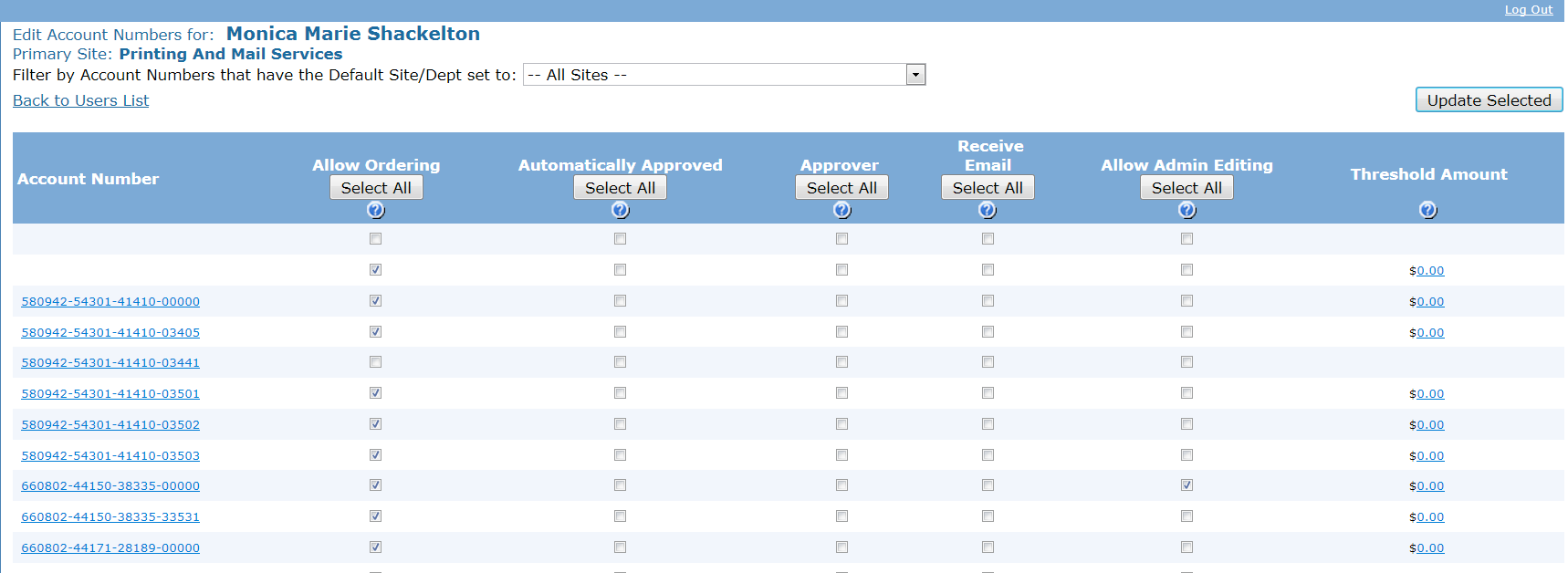
The departmental approver will select from the list of account numbers by checking the box that applies next to that field.
Example - 


Locate the account number from the list. Check the appropriate box(s) that apply pertaining to each account number. If the account number is not listed please submit a request to Printing Services @ printshop@csufresno.edu for account setup.
- Allow Ordering – When checked, this user will have the account number as an option when ordering.
- Automatically Approved – When checked, orders from this user will not require approval. Orders will immediately receive a status of “submitted”. If using a dollar threshold amount for an account do not select this option.
- Approver – When checked, this user will be able to approve orders for this account number. One person’s approval is sufficient to submit an order.
- Receive Email – When checked, this user will receive an approval email for each order submitted to this account number.
- Allow Admin Editing – When checked, if the user has a security level of ‘Admin’, this user will be able to edit these approval settings for this account number.
- Threshold Amount – Only orders greater than the Threshold Amount will require approval and/or receive an approval email if not automatically approved. If using a dollar threshold amount for an account do not select the Automatically Approved option
When using auxiliary funding you will need to select the following corresponding account number:
Foundation funding select - 580942-54301-41410-03503
Athletic Corp. funding select - 580942-54301-41410-03405
ASI funding select - 580942-54301-41410-03501
Association funding select - 580942-54301-41410-03502
You may never set a dollar threshold to any of these account numbers.
Next, click on the  to save all of the selections made.
This HTML version was generated with AI assistance and may contain errors or omissions. The original approved PDF remains the official document of record. An alternative accessible format is available upon request from the document creator in accordance with Title II of the ADA.