Quick Reference Guide: P2P Notification Settings
Use this quick guide to setup your notification settings (email, P2P notifications etc) - setting options are
- None
- Notification (notifications are displayed in top right corner of P2P website - see screenshot below)
- Email & Notification
Login to CSUBUY P2P
- Click on the silhouette of the person on the top right
- Click on “View My Profile”
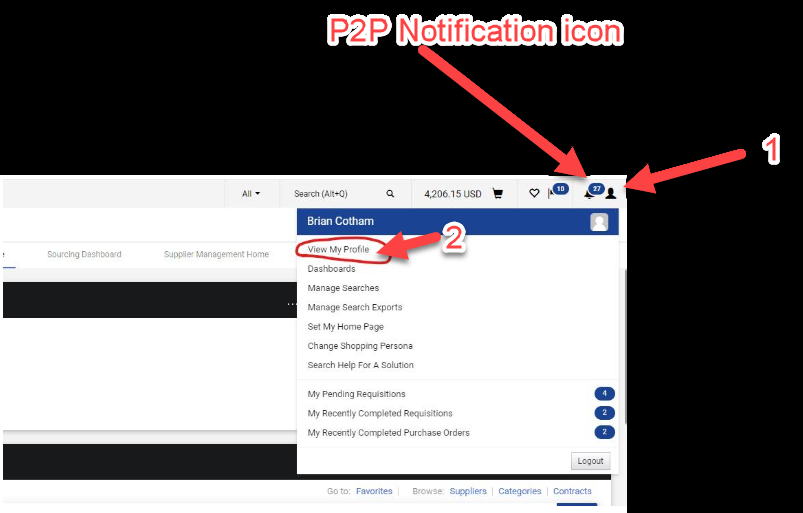
- Then on the left menu, click on “Notification Preferences” and then you can select each category you would like to edit. After clicking on the category you would like to edit, then click on “Edit Selection” in the top right corner.
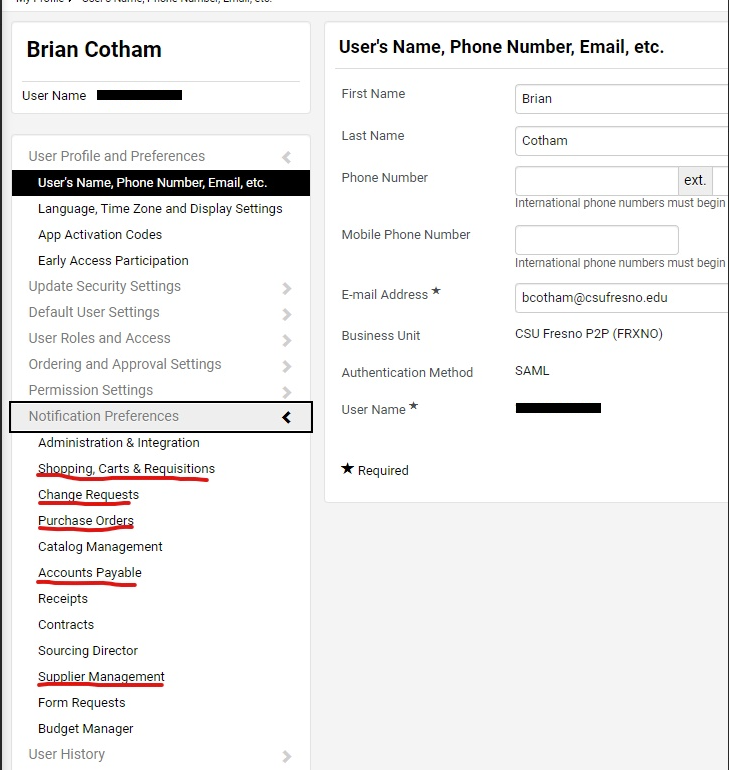
Notification Categories and recommended items to edit are listed below. Setting options are:
- None
- Notification (notifications are displayed in top right corner of P2P website)
- Email & Notification
- PR Pending workflow approval (for approvers)
- PR Workflow complete/PO created
- PR Line item rejected
- Cart/PR rejected/returned
- Change Request pending workflow approval (for approvers)
- Change Request Workflow complete/merged to PO
- Change Request rejected/returned
- PO Sent to Supplier
- PO Confirmation/Acknowledgement
- PO line item rejected
- PO rejected
- PO line item backorder notice
- PO Line item cancellation notice
- Voucher pending workflow approval
- Supplier (Requested by You) is approved in Workflow
This HTML version was generated with AI assistance and may contain errors or omissions. The original approved PDF remains the official document of record. An alternative accessible format is available upon request from the document creator in accordance with Title II of the ADA.