Updating Chartfields
Learn how to adjust and apply expenses to Chartfields. Chartfields will always populate automatically if they have been defaulted in the profile but can be adjusted using this process.
SPLIT TOTALS BY UPDATING A REQUISITION’S CHARTFIELD
- Navigate to Orders > Search > Requisitions.
- Open the requisition you would like to edit.
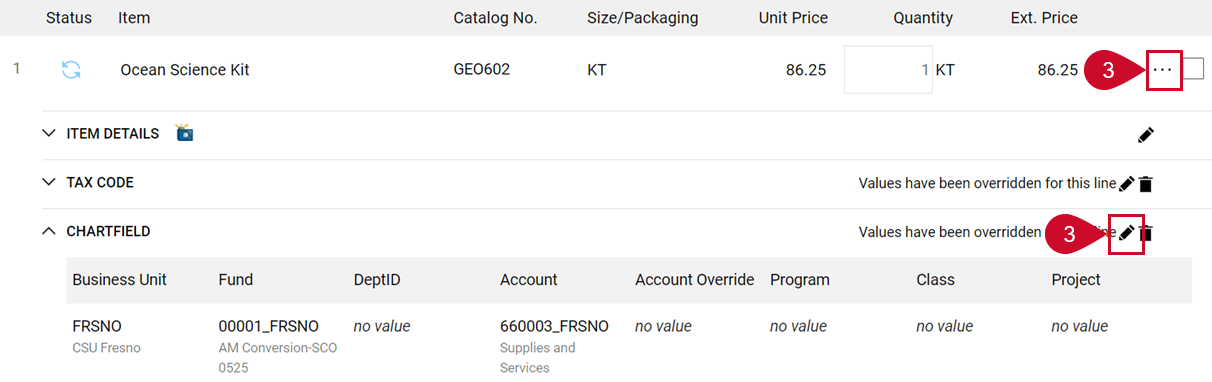
- Select the Line Action Items ellipses in the Item section and select Override > Chartfield in the drop-down menu or select the Edit Chartfield pencil icon. The Override: Chatfield box displays.
- To add additional lines, select the Plus icon.
- Enter Chartfield information in the fields. Any field with an asterisk is required. For additional lines edit the fields. Every line’s columns will need to be updated manually or copied.
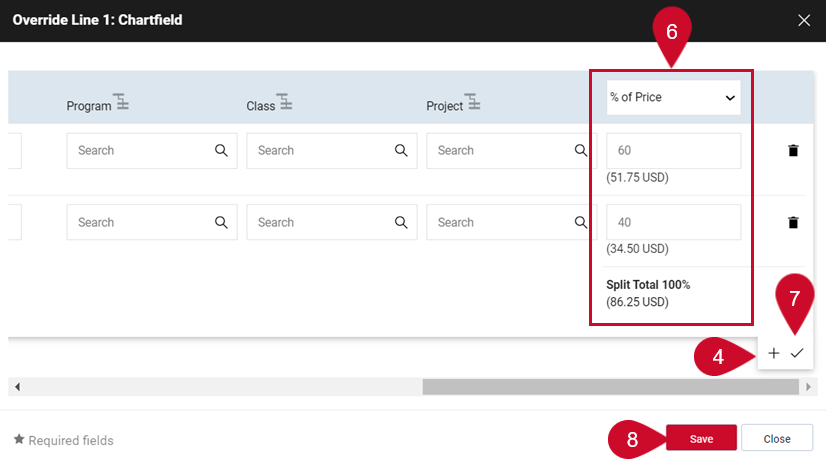
- When splitting a Chartfield determine how it will be split. Select the % of Price drop-down menu to edit this option.
- Enter the correct split percentage or total in the distribution fields. Select the Checkmark icon to verify the Split Total is equal to 100% or quantity.
- Select Save.
This HTML version was generated with AI assistance and may contain errors or omissions. The original approved PDF remains the official document of record. An alternative accessible format is available upon request from the document creator in accordance with Title II of the ADA.