Student Timekeeper Handbook
Issued by:
Human Resources
Joal Administration - 211
P: 559.278.2032
Table of Contents
- Introduction & Mission Statement ................................................................................................................ 1
- General Student Employment Information ..................................................................................................
2
- Orientation ............................................................................................................................................ 4
- Position Description .............................................................................................................................. 4
- Nature of Employment .......................................................................................................................... 4
- Purpose of Student Employment........................................................................................................ 4
- Student Employment Eligibility Requirements ...................................................................................... 4
- Work Hours (Limitations) ......................................................................................................................4
- Concurrent Appointment ...................................................................................................................... 5
- Benefits & Works Compensation ..........................................................................................................5
- Student Assistant Duties & Responsibilities ..................................................................................................6
- Conduct ................................................................................................................................................. 6
- Dress Code ............................................................................................................................................ 6
- Meal Breaks and Rest Periods ............................................................................................................... 6
- Attendance............................................................................................................................................ 6
- Personal Phone Calls/Cell Phone Usage ................................................................................................ 6
- Parking ..................................................................................................................................................6
- Homework ............................................................................................................................................ 6
- Policies and Procedures ................................................................................................................................
7
- Confidentiality & The Family Educational Rights and Privacy Act (FERPA) ........................................... 7
- Equal Employment Opportunity (EEO).................................................................................................. 7
- Harassment Policy .................................................................................................................................. 7
- Nepotism Policy ..................................................................................................................................... 8
- Smoke Free Work Place Policy ............................................................................................................... 8
- Drug Free Work Place Policy8
- Safety ...........................................................................................................................................................
8
- General Code of Safe Practices.............................................................................................................. 8
- Safety Awareness ................................................................................................................................. 8
- Employee Concerns ..................................................................................................................................... 9
- Student Assistant Job Posting ......................................................................................................................
9
- How to hire a Federal Work Study Student………………………………………………………………………………………………………………….9
- Job Posting Information ........................................................................................................................ 9
- GPA Requirement.................................................................................................................................. 9
- Informational Workshops ..................................................................................................................... 9
- Hiring a Student ........................................................................................................................................... 10
- Add Student Job (New Employee) ................................................................................................................ 11
- Complete Background Check Questionnaire ................................................................................................ 12
- Add Student Job (No Break in Service-transition from 1870 to 1874 OR 1874 to 1870… .................................13
- Add Student Job (Previous Employee- Break in Service)… ............................................................................ 14
- Add Student Job (Work Study)… ................................................................................................................... 15
- Student Hire Action/Reason Codes… ........................................................................................................... 16
- Types of Student Employment… ...................................................................................................................17
- Change Reports To ....................................................................................................................................... 18
- Changer Chartfields To .................................................................................................................................. 19
- Student Assistant Pay Process...................................................................................................................... 20
- Add, Delete, or Change Time……………………………………………………………………………………………………………………..22
- Department Pay Period Report………………………………………………………………………………………………………………….23
INTRODUCTION
Congratulations and welcome to your position as your departments Student Employee Supervisor/Timekeeper! As a Student Employee Supervisor of Fresno State, we want to provide the best work experience possible so that students can gain real working skills to take into their careers post-graduation. Campus job opportunities are available to students in an effort to foster students’ growth personally and professionally. We understand the challenge that many students face of having to work and at the same time attending school. We hope this employment opportunity helps alleviate some of that load and allows them to thrive in their education! The goal and responsibility of Student Employee Supervisors are to coach and mentor our student assistants, to help them develop strong work habits, learn responsibility, time management and equip them with leadership skills that will afford great benefits in today’s job market!
As a Student Employee Supervisor, you are a vital part of our university. This handbook will introduce you to our university mission, new-hire/re-hire processes, relevant student employee policies, expectations and codes of conduct. Policies, procedures and rules are subject to change without notice and without regard to prior policies, procedures or rules that were in effect at the time of initial employment. Please read it carefully and keep it for future reference!
If at any point you have an issue or concern, please contact us at the Human Resources Department for guidance and assistance at 559.278.2032.
MISSION STATEMENT
Our mission is to enhance the university community by attracting, retaining, and supporting a quality workforce in its effort to provide an excellent educational program for our students.
GENERAL STUDENT EMPLOYMENT INFORMATION
Orientation
As a Student Assistant Supervisor/Timekeeper, you are responsible for providing students with their orientation and any necessary training within your department. Please keep in mind that orientation and training may vary from department to department.
Position Description
All student assistants should be provided with a position description from your respective department. It is important for students to recognize that their job duties are a vital part of ensuring a successful work experience. You will also be responsible for going over what the needs are within the department and how they pertain to their role as a student assistant. In many cases this may be their first job, so it is extremely important as their Supervisor/Timekeeper that you provide them with all the training/skills necessary for them to be a successful part of your department.
Nature of Employment (At-Will)
All student employment with Fresno State is voluntary and is subject to termination by your respective department or by the student at will, with or without cause, and with or without notice, at any time. Due to student employment being temporary by nature, student employment is automatically terminated at the end of the academic year. Please coordinate with your students for the availability of appointments (employment) for the upcoming semester or have them visit the Career Development Center webpage and view current jobs listed on HireFresnoState.
Purpose of Student Employment
The purpose of student employment is to provide students with a valuable experience related to their educational goals and assist with financial support to help meet the cost of attending college. In addition student assistants provide useful supportive services to the various academic and administrative programs and departments.
Student Employment Eligibility Requirements
In order to be eligible for student employment, a student must be currently enrolled at Fresno State during the regular term Fall or Spring, whichever is applicable. Student assistants must be enrolled in at least six (6) units if an undergraduate student; four (4) units if a graduate student and cannot be employed in a regular state classification.
In order to be eligible for continuing employment during summer session the student needs to have taken courses in the preceding spring and be accepted for classes in the following fall semester. The same notion applies for continuing employment during winter session, the student needs to have taken courses in the preceding fall and be accepted for classes in the following spring semester.
Entering students may be employed as student assistants, if they have received formal notice of admission to Fresno State. Graduating student assistants are allowed to work one term immediately following graduation, up to the day before the next term starts.
Work Hours (Limitations)
Student Assistants, including Bridge and Federal Work-Study programs are limited to a maximum of 8 hours per day and 20 hours per week when regular classes are in session. A student may work up to 40 hours per week if they are not enrolled in classes during the following breaks: winter, spring, and summer.
Overtime: Student assistants do not qualify for overtime. In California, overtime is considered to be anything over 8 hours in a day and anything over 40 hours in the work week.
Concurrent Appointment
A student may be concurrently employed as a Student Assistant, Work-Study Student Assistant, Graduate Assistant and/or Teaching Associate as long as the student does not exceed a combined total of 20 hours per week during a regular semester and 40 hours per week if they are not enrolled in classes on campus during spring, summer, or winter session. However, student assistants may not concurrently hold a staff position, lecturer/faculty position or two concurrent work-study positions.
Benefits/Workers’ Compensation
Student assistants are paid for time worked. Students do not accrue vacation, sick or holiday time nor are they eligible for health benefits. Please note that as a condition of enrollment at Fresno State, students are automatically enrolled in the CSU-approved health insurance policy. The health premiums are a part of the Tuition and Mandatory fees for the semesters they attend. For services please visit the Student Health and Counseling Center.
Student assistants who suffer an injury/illness on the job or due to his/her job, are entitled to Workers’ Compensation benefits. If an injury occurs, the student must immediately notify you as their Supervisor or the Workers’ Compensation Manager Tracey Garza at (559) 278-2125, of the work illness or injury.
STUDENT ASSISTANT RESPONSIBILITIES AND RIGHTS
Conduct
All student assistants are expected to follow acceptable business and professional principles in matters of business and personal conduct. The university expects all student assistants to adhere to the following general principles:
- Observe the highest standards of professionalism at all times.
- Perform responsibilities in a manner consistent with the university’s values and ethical standards.
- Comply with all laws applicable to the institution.
- Treat everyone they come in contact with, in a welcoming and respectful manner.
Unsatisfactory performance, work habits, or overall attitude, conduct or demeanor; violation of institutional policies, procedures or guidelines or any other behavior or conduct deemed inappropriate by the university or department may result in termination of employment for a student.
Dress Code
Student assistants should dress in attire that is appropriate for their particular position of employment. Please be sure to provide students with clear expectations of what appropriate attire is for the specific department they will be working in.
Meal Breaks & Rest Periods
Student assistants working more than six (6) hours in a day are required by law to take at least a ½-hour unpaid lunch break within the first five (5) hours of working.
Student assistants are entitled to a 15-minute rest period (break) for every four (4) hour interval worked or major fraction thereof. Rest periods are employer paid. Breaks may not be accumulated and used as excused time off. In some departments, you may schedule rest periods.
Attendance
A vast majority of Fresno State departments depend upon student assistants daily. Students should understand that their acceptance of the position on-campus does require them to have good attendance habits and to be punctual. As a Student Supervisor please remember that Student Assistants are Students first, but they also need to provide you with their school schedule to ensure appropriate coverage within the department.
Communication of unforeseen absences due to illness or other uncontrollable circumstances should be addressed as soon as possible. It is the student’s responsibility to inform you in a timely manner for approval of any absences that may occur due to vacation, class conflicts, etc.
Personal Phone Calls/Cell Phone Usage
Personal telephone calls or cell phone usage are discouraged and should be made during breaks or lunch time. However, we should understand that there are times when they are necessary during business hours. Therefore, student assistants should communicate with you about any situation that may require the use of their cell phone.
Parking
Student employees who wish to park on campus must purchase a student parking permit. Student employees are not eligible to park in employee parking lots/spaces.
Homework
Doing homework or studying while at work is prohibited unless permission is given.
POLICIES AND PROCEDURES
Confidentiality & The Family Educational Rights and Privacy Act (FERPA)
FERPA is a federal law that guarantees the confidentiality of student records. Student employees must not, under any circumstances, release student information to anyone (including parents and employers), unless they have been instructed to do so. Student employees are expected to reframe from discussing student information with family or friends. Student assistants are not permitted to check into student records, unless it is a required function of the job.
Some student assistants may have access to sensitive and proprietary information. Due to the nature of certain information, student assistants who are in a sensitive positon may be required to complete an Accurate Background Check and/or fingerprinting through Live Scan. If this is a requirement, you must inform the students of the appropriate steps to take. The protection of confidential business information is vital to the interests and the success of Fresno State. Confidential information should not be shared with anyone without expressed consent. As a student assistant Supervisor, it is imperative that you train students on the importance of confidentiality.
Student employees who improperly use or disclose confidential information will be subject to disciplinary action, up to and including termination of employment and legal action.
Note: If a job requires a student to access confidential information, you must have the student complete the Student Employment Confidentiality Agreement.
Equal Employment Opportunity (EEO)
Fresno State is committed to a respectful work and learning environment characterized by integrity, civility and ethical behavior by its faculty, staff, and students. The California State University does not discriminate in employment on the basis of race, color, national origin, gender, age, marital status, religion, mental or physical disability, sexual preference, pregnancy, or special disabled veteran status (Vietnam era or other covered veteran status). Protection against unlawful discrimination or harassment in the work place is guaranteed by a number of federal and state civil rights laws, rules, and regulations, by executive orders, and by university policies. Fresno State’s Policy Statement (in the Equal Employment and the Equal Opportunity Plan for Individuals with Disabilities, Disabled Veterans, Veterans of the Vietnam Era, and Other Eligible Veterans) addresses equal opportunity in employment for students.
Fresno State is an Affirmative Action/Equal Opportunity Employer.
Harassment Policy
Harassment on the basis of sex is prohibited by Title VII of the Civil Rights Act as well as Title IX of the Education Act. Sexual harassment is a violation of Section 703 of Title VII. Sexual harassment refers to the unwanted imposition of sexual attention usually in the context of a relationship of unequal power, rank, or status, as well as the use of one’s position of authority in the university to bestow benefits or impose deprivations on another. This applies equally to all students, staff, faculty, and managers at California State University, Fresno. Harassment includes verbal, nonverbal, and/or physical conduct that has the intent or effect of unreasonable interference with individuals’ or groups’ education or work performance. This may also include actions that create an intimidating, hostile, or offensive working or learning environment. Both men and women can be the victims of sexual harassment.
Student Supervisors or Students who believe they are victims of sexual harassment should contact the Office of the Vice President for Student Affairs and Dean of Students, (559) 278-2541. The staff can explain the complaint procedures available to students on our campus. For more information about the complaint process, please contact Marylou Miller, Associate Vice President of Human Resources, (559) 278-2364. Other resources include the deans and associate deans who are trained to respond to inquiries.
*Required Training: Student assistants are required to complete the CSU: Preventing Discrimination and Harassment for Non-Supervisors course. If you do not receive notification to complete the required training, please advise your lead.
Nepotism Policy
It is the policy of the California State University to seek the most qualified candidates through appropriate search procedures preceding each appointment and promotion. Student Employees with immediate family of members working on campus must adhere to the guidelines in the CSU Policy HR 2004-18 (http://www.calstate.edu/hradm/pdf2004/HR2004-18.pdf). If you have questions regarding hiring eligibility, please contact Human Resources.
Smoke-Free Campus
Fresno State’s commitment to student success extends beyond the classroom, and we strive for a safe and healthier environment for which students, faculty, staff and visitors can learn, teach, work and think. Thus, Fresno State is now 100% tobacco-free, smoke-free, and vapor-free campus.
Drug-Free Workplace Policy
Fresno State complies with state and federal drug abuse regulations including the Drug Free Workplace Act of 1988. It is against Fresno State policy to unlawfully manufacture, distribute, dispense, possess or otherwise use a controlled substance in the workplace. Student assistants found to have violated this policy will be subject to disciplinary action up to and including termination. Student employees will be provided the Fresno State drug-free workplace policy at the time of hire. The student assistant will be required to certify his/her understanding of the policy by signing an employee certification form.
SAFETY
General Code of Safe Practices
It is the policy of Fresno State that everything possible will be done to protect students, employees, customers and visitors from all accidents. Safety is a cooperative undertaking requiring participation by every employee, including student assistants. Please do your part to ensure the safety of yourself and students. The Safety Coordinator within your department should provide all Students with a copy of the general code of safe practices during their orientation.
It’s important to inform all Student Assistants with what the emergency and evacuation procedures are for their area. Although these situations may never arise during their employment, the Students should know what to do and what is expected of them in the event of an emergency.
Safety Awareness
In fulfilling the responsibilities of their new position, Students may become aware of safety problems such as heavy boxes stacked too high, cracks in flooring, or other potential hazards. Students should inform you immediately of the problem so that steps can be taken to quickly correct it. If there is an unsafe working condition in their work area that you cannot resolve, immediately notify the Environmental Health and Safety, Risk Management & Sustainability Administrator at 559.278.7422.
EMPLOYEE CONCERNS
Students are a valued part of our campus! We want them to enjoy their work experience and gain the experience that will benefit their future. We encourage you to keep us informed should there be any concerns about their employment, or should you encounter any work-related problems that need to be addressed.
If you have any concerns, questions, complaints, and suggestions, please inform your department manager. We want to ensure that you have the opportunity to take immediate action and address concerns. Informing us early on will help us initiate an interactive process that will bring about a timely resolution.
In the event that a work-related problem cannot be resolved by your department manager, please contact the Human Resources department at (559) 278-2032.
STUDENT ASSISTANT JOB POSTING
It is mandatory for all departments hiring Students to post job openings through the Career Development Center onto the HireFresnoState (formerly BulldogLink & HireTopDogs) website at http://www.fresnostate.edu/studentaffairs/careers/. If you have further questions about creating a job description or posting, you may contact the Career Development Center at 278- 2381.
How to Hire a Federal Work Study Student
For information on how to hire a Federal Work Study Student please contact the Financial Aid department or the Work Study Coordinator Lisa McReynolds at 278-6566. You may also visit the Financial Aid website at http://www.fresnostate.edu/studentaffairs/financialaid/
Job Posting Information
A HireFresnoState posting may serve as a job description and a job advertisement. All student employment job opportunities must be made reasonably available to all eligible students to comply with federal regulations and Equal Employment Opportunity laws. Hiring departments are required to advertise their job openings with enough detail to qualify as the job description.
Informational Workshops
Future workshops will be made available to all Supervisors/Timekeepers discussing all Hiring Policies, Hiring Procedures, and Student Assistant Expectations.
HIRING A STUDENT
Once a student is offered a position in any given department. The student MUST be hired in PeopleSoft proactively. The department hires the student using the CSU Student process page.
Example of New Student Hire:
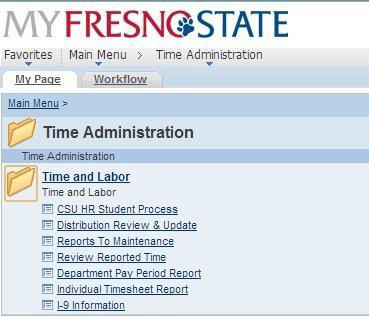
Main Menu > Time Administration > Time and Labor > CSU HR Student Process
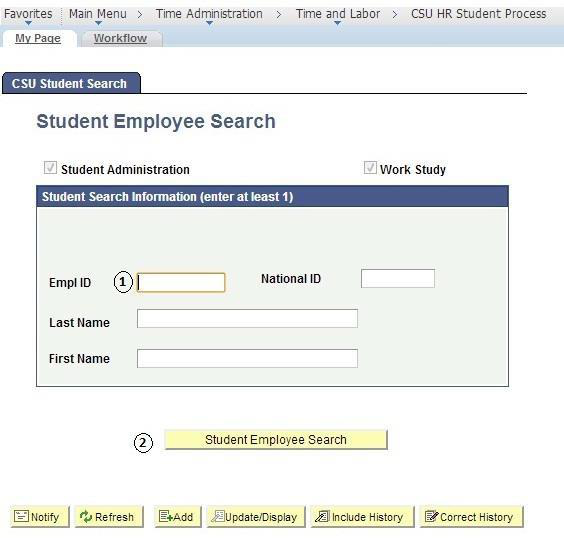
- Enter the Students ID number.
- Click “Student Employee Search”.
ADD STUDENT JOB (New Employee)
If student has NEVER been employed, enter a NEW record for them.
If the student has previously been employed, select the first INACTIVE record to rehire student. (REH/REH) whether it is a record from your department or not.
Student WILL NOT be allowed to work until all hiring paperwork, including Form I-9, is complete.
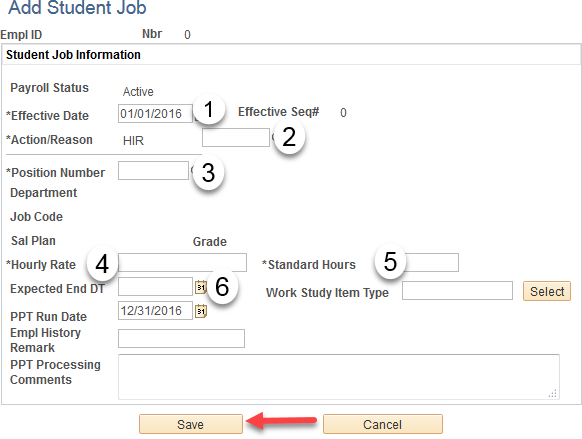
- Enter the Effective Date (FIRST DAY OF ACTUAL WORK).
- Action will be HIR for “Hire. Reason will be PT for “Appoint or CON for “Concurrent”, (Student has other ACTIVE student assistant position).
- Position number. Click on magnifying glass, pull down tab for “Department”, enter your department number. A list of job codes will appear. Be sure to select correct job code for your department.
Job Code. *See list page next page. The Job Code will populate from the Position Number you selected in Step #3.
- Hourly Rate. Enter Student’s hourly rate of pay.
- Standard Hours must equal .40 (Used for benefits eligibility).
- Expected End Date. Use last day of academic year.
Click “Save”.
NOTE: Work Study student in last example.
Must enter “Work Study Item Type”.
COMPLETE BACKGROUND CHECK QUESIONNAIRE
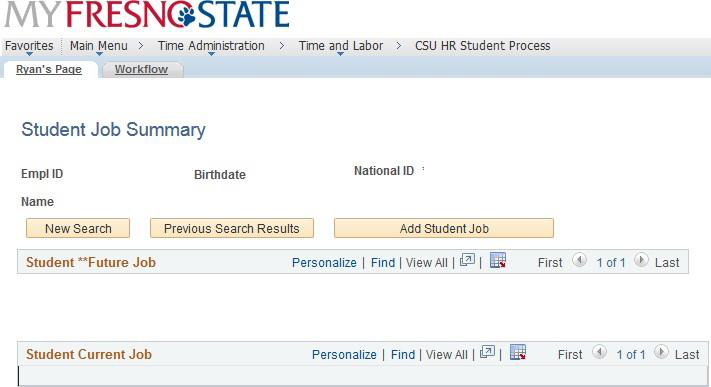
Once the Student has been hired, the Student Saved Successfully page will display.
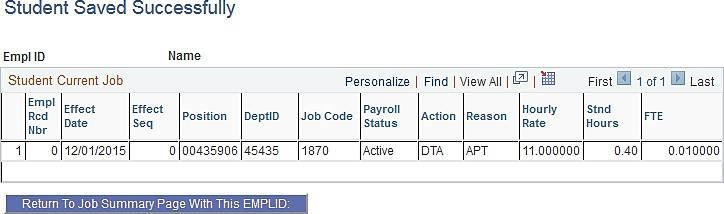
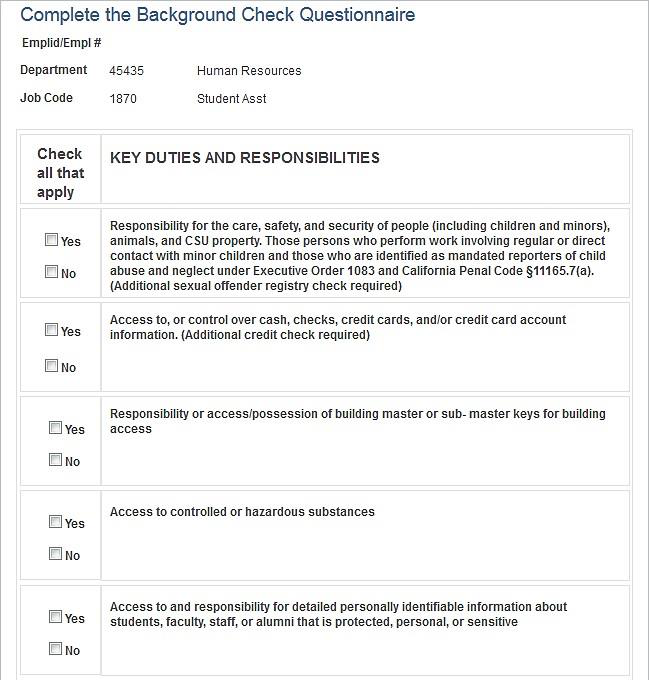
The Complete the Background Check Questionnaire will display at the bottom of the page.
This must be completed to determine if a background check is needed for the new Student Hire.
Answer each Key Duty and Responsibility by checking the Yes or No box.
If one or more of the Key Duties and Responsibilities is marked Yes, a Background Check will be required.
Human Resources will then notify the Department and student via email that a Background Check will be ordered through Accurate Background.
Once the Background Check is completed, the Student and Department will be notified that the Background Check is complete and the student may then begin their Student Position.
ADD STUDENT JOB (Previous Employee with No Break in Service)
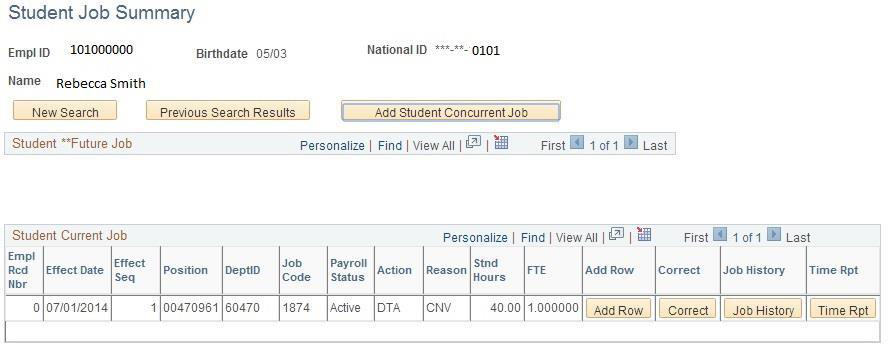
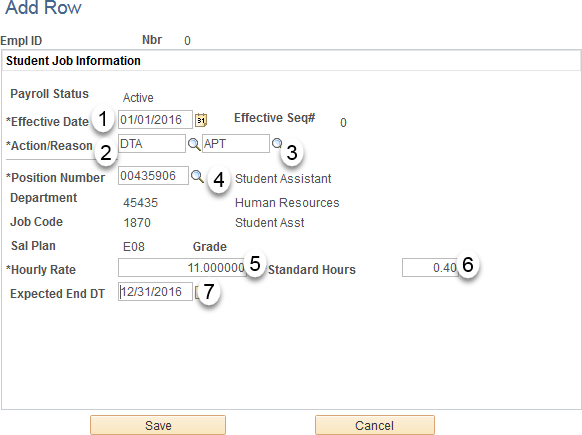
If the student is currently employed, and is changing job codes (1870 to 1874 or 1874 to 1870), select the ACTIVE record for your department. Use codes (DTA/APT) to update the student’s job code during transitions from Spring to Summer or Summer to Fall.
- Enter the Effective Date as the FIRST DAY OF THE PAY PERIOD.
- Action will be DTA for “Data”.
- Reason will be APT for “Renew Appointment”.
- Position number. Click on magnifying glass, pull down tab for “Department”, enter your department number. A list of job codes will appear. Be sure to select correct job code for your department.
Job Code. *See list page next page. The Job Code will populate from the Position Number selected in Step #3.
- Hourly Rate. Enter Student’s hourly rate of pay.
- Standard Hours must equal .40 (used for benefits eligibility).
- Expected End Date. Use the LAST day of the pay period
Click “Save”.
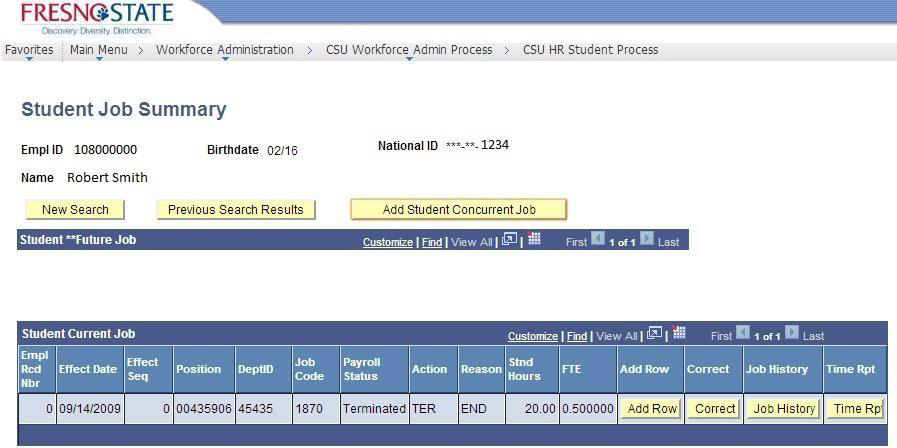
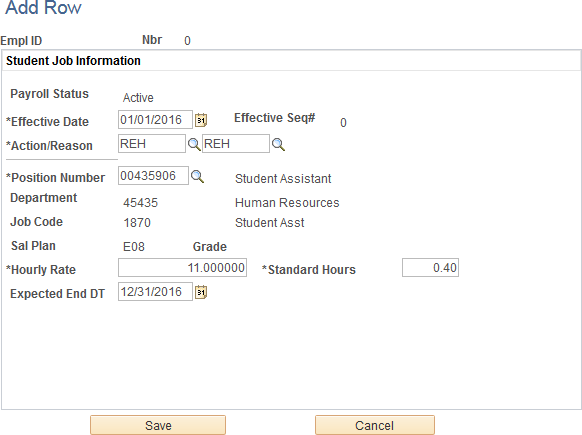
ADD STUDENT JOB (Previous Employee with Break in Service)
If the student has previously been employed, select the first INACTIVE record to rehire student. (REH/REH) whether it is a record from your department or not.
Student WILL NOT be allowed to work until all hiring paperwork, including Form I-9, is complete.
- Enter the Effective Date (First day of work).
- Action will be REH for “Rehire”.
- Reason will be REH for “Rehire”.
- Position number. Click on magnifying glass, pull down tab for “Department”, enter your department number. A list of job codes will appear. Be sure to select correct job code for your department.
Job Code. *See list page next page. The Job Code will populate from the Position Number selected in Step #3.
- Hourly Rate. Enter Student’s hourly rate of pay.
- Standard Hours must equal .40 (used for benefits eligibility.
- Expected End Date. Use last day of academic year.
Click “Save”.
ADD STUDENT JOB (WORK STUDY)
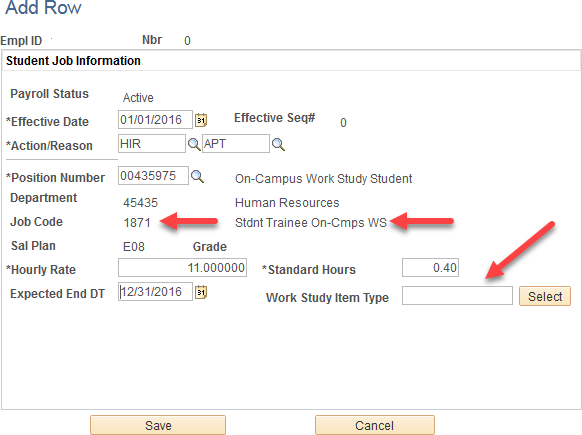
NOTE: Must enter “Work Study Item Type”.
The Work Study Item Type can be obtained from the Financial Aid Office. If you have any questions regarding a Work Study Item Type, please contact the Financial Aid Office directly at 278-
STUDENT HIRE ACTION/REASON CODES
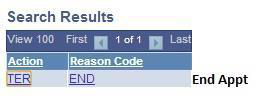
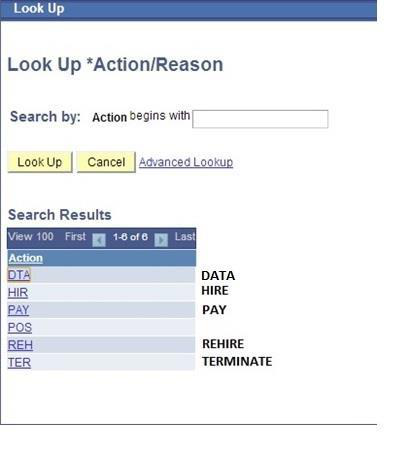
Displayed are ACTION CODES used for Student Employees.
The Action Codes should be used as follows:
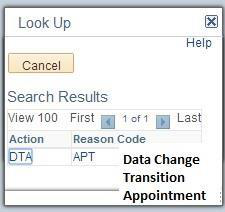
DTA = DATA Change
Used to transition existing appointment from 1870 to 1874 OR 1874 to 1870 job code
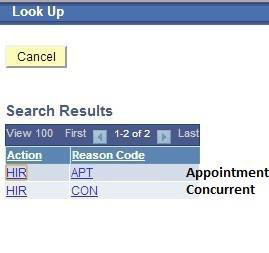
HIR = HIRE a NEW employee
No existing employment record or adding an additional employment record
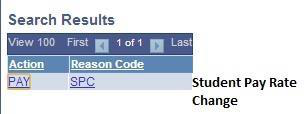
PAY = Change PAY Rate
Used to give student employee a pay increase.
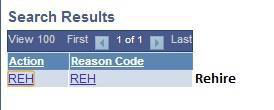
REH = REHIRE
Used to rehire employee from a record that shows Terminated.
TER = TERMINATE
Used to terminate student’s employment.
Displayed are REASON CODES used for Student Employees:
APT = APPOINTMENT
Used for transitioning existing employees to a new job code or appointing new employees
CON = CONCURRENT
Used for employee with 2 or more ACTIVE records
REH = REHIRE
Used for rehiring previous employees
SPC = STUDENT PAY RATE CHANGE
Used to increase student pay
END = END APPOINTMENT
Used to terminate employment record
TYPES OF STUDENT EMPLOYMENT
Displayed is a list of Job Codes for Student Employees.
TYPES OF STUDENT EMPLOYMENT
Campus Employment (CE)
Class Code 1870 & Class Code 1868 (Non-resident Alien)
- The Campus Employment Program is a university-funded program that enables undergraduate and graduate students to work part-time, on-campus jobs regardless of financial need. To qualify for CE, students must be enrolled in a degree-granting program, carry the required amount of units, be eligible to work in the United States, and be in good judicial standing.
Federal Work-Study (FWS)
Class Code 1871(Off-Campus) & Class Code 1872 (On-Campus)
- The Federal Work-Study program is a government-sponsored program that enables students to work part-time to help meet the cost of their education. Jobs may be located on or off campus. In order to be hired through this program, FWS recipients must have financial need as determined by the Financial Aid Office.
Bridge Student Assistant (BSA)
Class Code 1874
- Bridge Student Assistants are students not enrolled in summer session and are employed, working more than 20 hours per week during the months of June and July.
CHANGE REPORTS TO
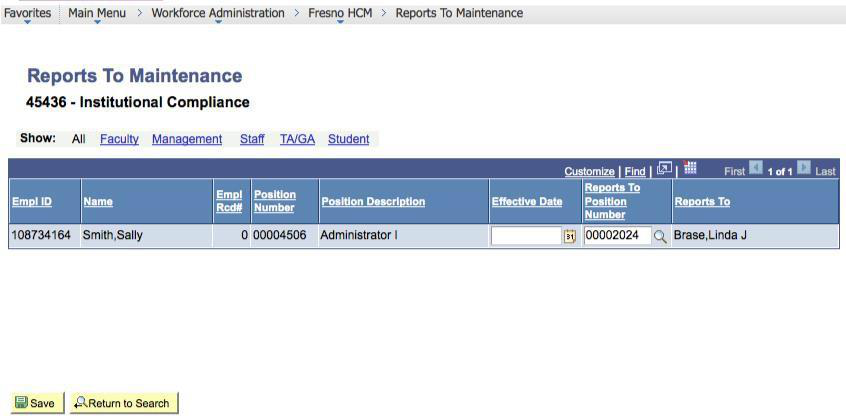
When entering the student new hire into PeopleSoft, the “Reports To” manager will automatically default to one Department Chair or MPP per department. The “Reports to” may be changed to the specific MPP or Department Chair supervising the student for final approval of time. This is manually entered by the department timekeeper, as displayed below.
Main Menu > Time > Reports to Maintenance.
- Search by Department Number.
- Find Employee you wish to change “Reports To” for.
- Enter the “Effective Date”.
- Search for the “Reports To Position Number” using the magnifying glass icon in the row of the employee you wish to make the change for.
- Search by Last Name or department. When you locate the new “Reports To”, click on their name.
- Click “Save”.
NOTE: HR will review and process accordingly. The update will be made to either Position management and job data (if 1 incumbent) or job data only for multiple incumbents.
CHANGE CHARTFIELDS
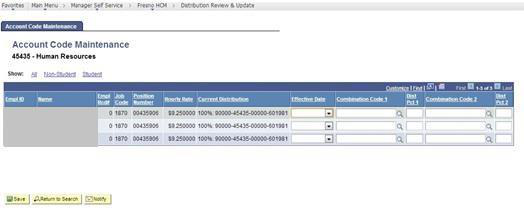
When entering the student new hire into PeopleSoft, the Chartfield will default by job code. The Chartifield will default to the last used Chartfield each pay period. Should the Chartfield need to be changed, or split funding need to be added, the Timekeeper may manually change the Chartfield as outlined below.
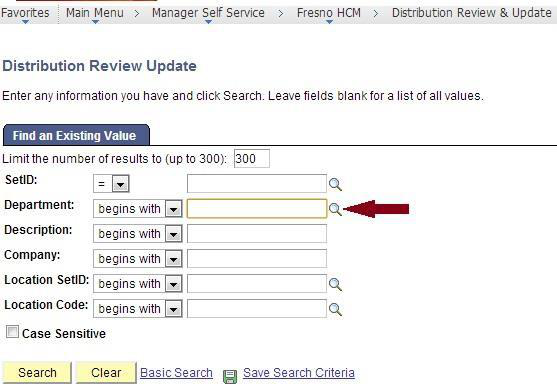
Main Menu > Time Administration > Time and Labor> Distribution Review and Update
- Search by department number.
- The Account Code Maintenance screen will display. (Example 1-Full Screen, Example 2-View of fields to change.
- Enter effective date of change. Enter Chartfield code in “Combination Code 1” field. If you are splitting funding, you may enter 2nd Chartfield code in “Combination Code 2” field, and charge to Chartfields by percentages.
- Click “Save”.
STUDENT ASSISTANT PAY PROCESS
Reviewing and Approving Reported Hours Worked
Student assistants are responsible for entering their hours electronically. As a Student Assistant Timekeeper, you are responsible for reviewing and approving reported time either at the end of each work week or the end of every month. This section will demonstrate how you will review and approve reported time.
- Log onto MyFresnoState.
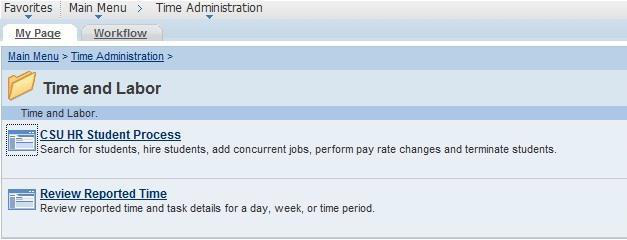
- Main Menu > Time Administration> Time and Labor> Review Reported Time.
- NOTE: This page will ONLY show time reported time that has NOT been approved.
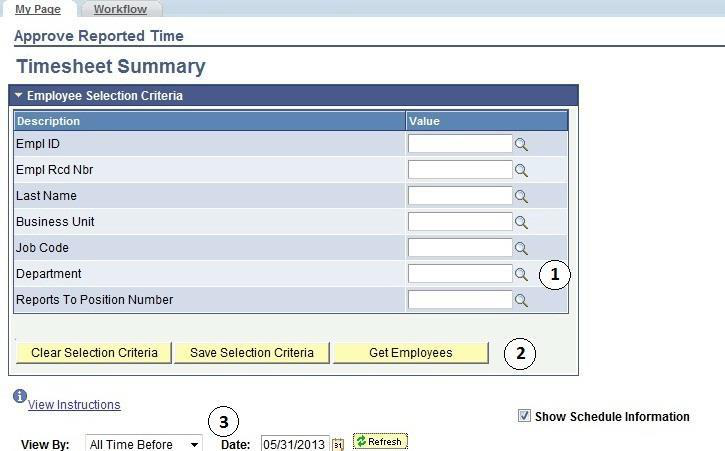
The Timesheet Summary page will display.
- Enter criteria. You may enter by:
- Department number, which will bring up all student employees.
- individual employees by using EmplID, Last Name, First Name,
- Group ID.
- Click “Get Employees”
Note: You may view the employee population by:
- “All Time Before” Date, by “Week”, or by “Day”. You may approve all student employees’ time at once by clicking “Select All”, followed by “Approve Selected”.
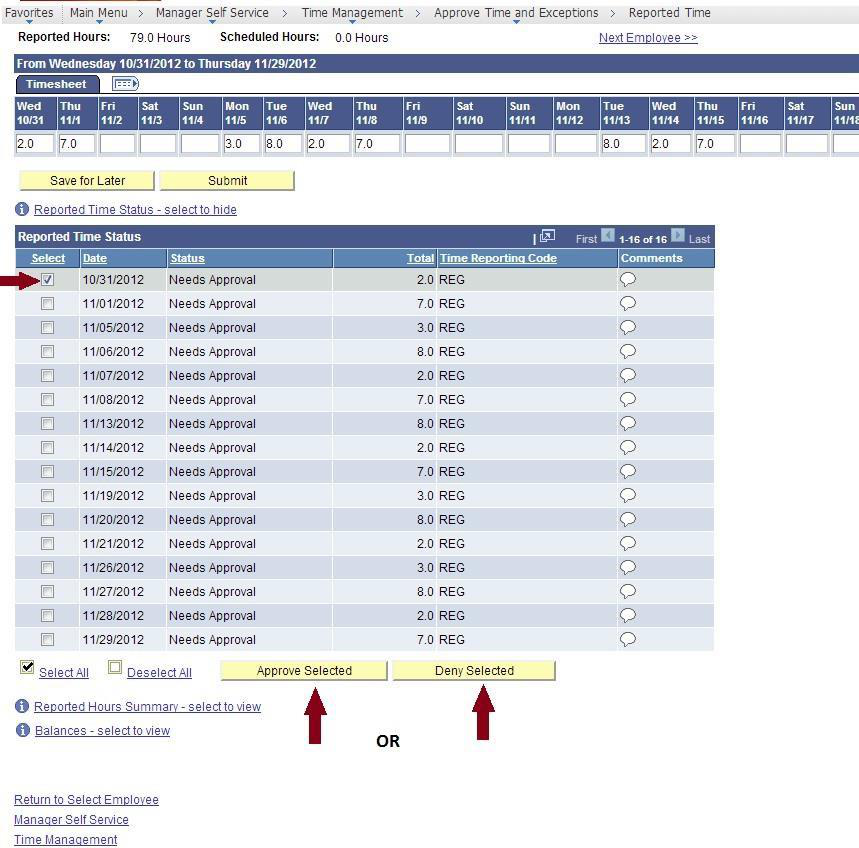
If a detailed review of individual(s) student employee timesheet is necessary, then click on the individual’s name, and the following will appear:
- You may approve or deny submitted time by day (see arrows).
Note: Comments may be made for specific transactions (either by student or by Timekeeper). If comments are made, the comment “bubble” on the right will look like this:

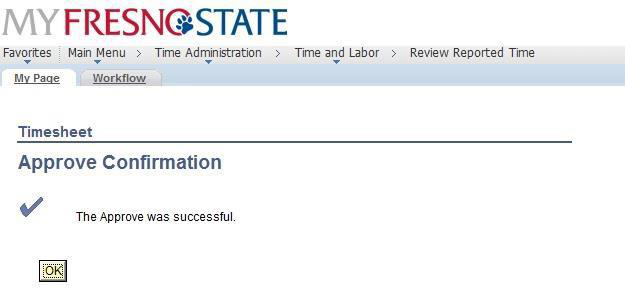
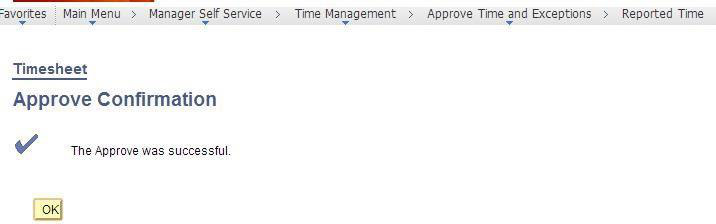
Once time is approved, you will receive the following confirmation message.
ADD, DELETE, OR CHANGE TIME
This section demonstrates how to add, delete, or change the time of your Students after they have submitted their hours. Your students do not have access to correct their time entry mistakes after they submit their hours. All corrected time will be available for approval immediately. Note: Students will not be allowed to enter over 8 hours worked per day.
Navigate to Timesheet
Search for and select the employee that needs time correction.
- Enter the corrected total hours worked that day. Select REG - Regular Hours Worked from the Time Reporting Code dropdown menu. The student will automatically be sent an email notifying them of the change.
- Click the “Submit” button
- Click on the “comments bubble” and add comments regarding the change
- Select the day to approve
- Click the “Approve Selected” button.
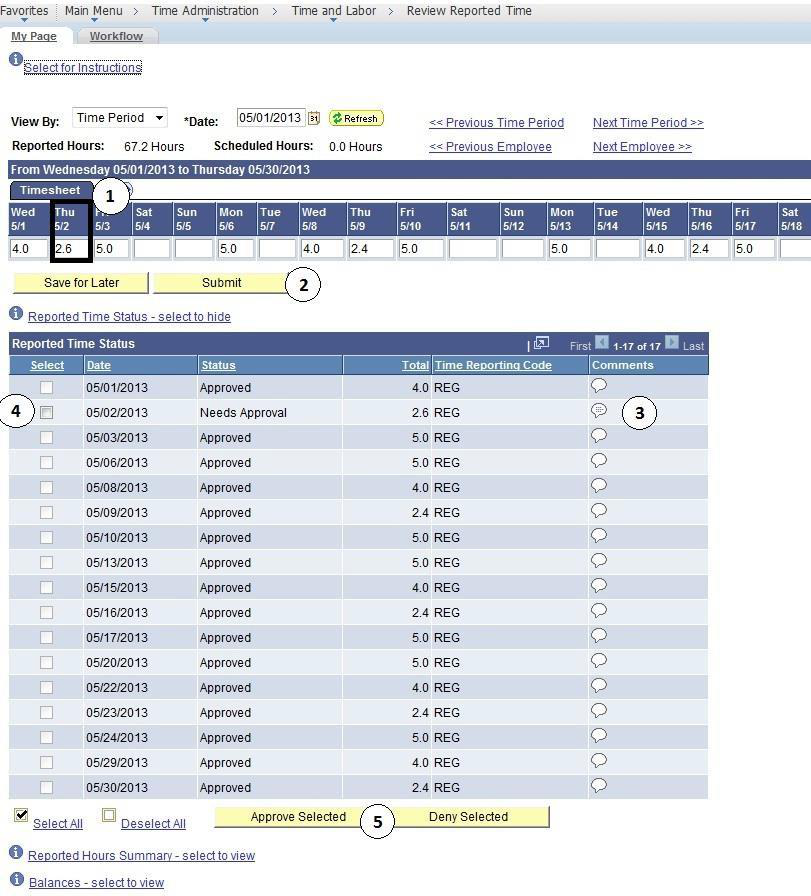
Click “Approve Selected”
Once you have approved changes, you will receive a
DEPARTMENT PAY PERIOD REPORT
The Department Pay Period Report is a report you can run to view all pay period report information for Student Employees as well as Hourly Staff Employees. This report may be run multiple times per month to monitor which employees have time outstanding that needs to be reviewed and approved. This report will also give work study balances for students under the work study program.
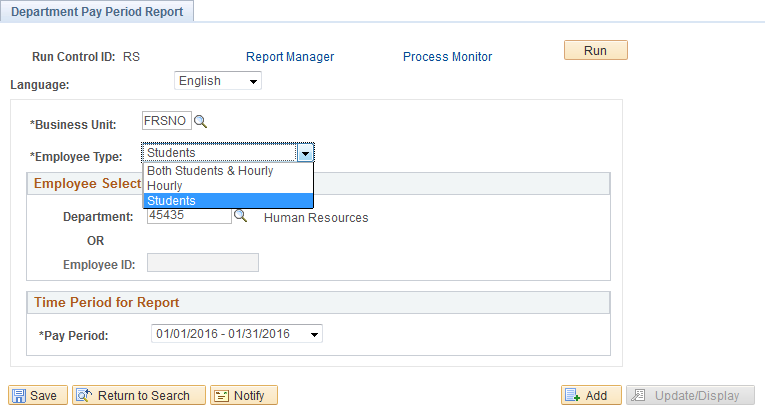
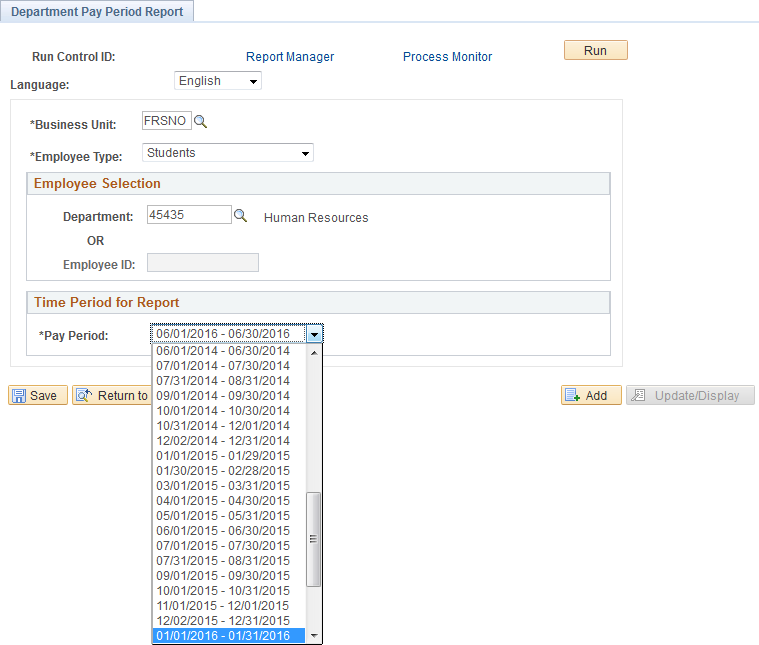
To Print the Department Pay Period Report, use the following path: Time Administration > Time and Labor > Department Pay Period Report
- You may sort the report by staff, hourly and student employees
- Enter Department Number
- Enter the Pay Period you would like to view.
- Click Run
- The Process Scheduler Request page will display, click Ok.
- Click Report Manager to find the Pay Period Report once it is processed.
The Department Pay Period Report is shown below. The example shows the report split in half due to space limitations
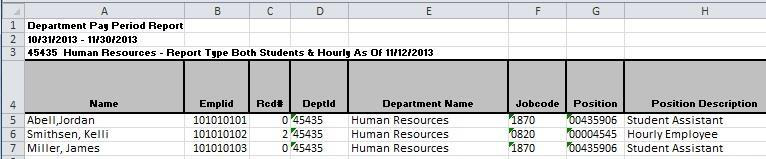

- Reported Needs Approved: Shows Employees Reported Time
Reported Approved: Shows Time already approved by Time Keeper - Payable Needs Approval: Time waiting for MPP/Chair approval
Payable Approved: Time already approved by MPP/Chair - Rate: Hourly rate of pay
- Estimated Gross: Amount of check before taxes
- Reports to: Reports to Manager
- Distribution Information: Chartfield being charged
- Remaining Work Study $: Amount of work study award remaining (if any).
This HTML version was generated with AI assistance and may contain errors or omissions. The original approved PDF remains the official document of record. An alternative accessible format is available upon request from the document creator in accordance with Title II of the ADA.