Separation Checklist
Procedure
All employees separating from California State University, Fresno must go through the employee checkout process per (SAM 8580.4). All State property assigned to an employee must be returned to the specific departments prior to departure.
Process
Employee:
It is an employee’s obligation to submit a letter of resignation/retirement to the employee’s department chair/manager. This letter must site your intent to resign/retire and the effective date of this action. The chair/manager must respond in writing to your notification to resign from your position.
Manager:
Complete the online ETR page to separate the employee and attach the separation letter and acceptance letter Written notification of separation must be received by Human Resources at least two weeks prior to the last day worked (or as soon as possible if less than two weeks’ notice is given). Note: Retirements are entered by the Benefits team.
Human Resources will activate the online separation process based on the day the separation information is received in their office. An automatic email notification will be sent to both the employee and their reporting manager regarding the online separation process. The Employee Separation Checklist will also be activated in the My Fresno State portal under Human Resources Activities, My HR Worklist. This checklist is used to track and clear all assets assigned to an employee, as well as verify that all items have been returned or inactivated upon separating.
Retirees
Employees retiring from the university must submit a letter to their department chair/manager with a copy to the Human Resources/Benefits office. This letter must state the effective date of this action. The chair/manager must respond in writing to your notification to retire with a copy to the Human Resources/Benefits office. Human Resources will then process the online ETR on behalf of the employee two weeks prior to the last day physically worked. An automatic email notification will be sent to both the employee and their reporting manager regarding the online retirement process. The Employee Separation Checklist will also be activated in the MY Fresno State portal under Human Resources Activities, My HR Worklist. This checklist is used to track and clear all assets assigned to an employee, as well as verify that all items have been returned or inactivated upon retirement.
How to access the Employee Separation Checklist
Log into the My Fresno State portal and click the Human Resources Activities tile.
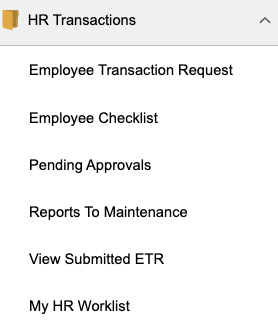
Navigate to HR Transactions, My HR Worklist to access your checklist(s) by clicking on the link.
Employee Separation Checklist
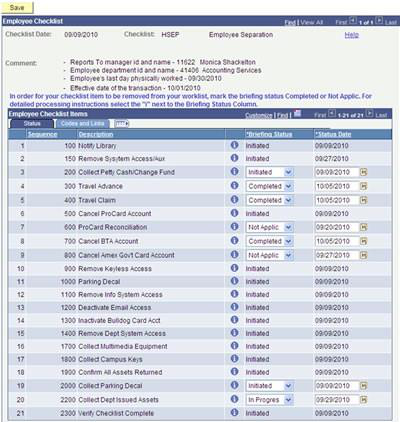
All items listed have been assigned to specific campus departmental personnel who will actively work the employee checklist clearing the assigned items. Once all items have been updated to Not Applic or Completed the employee is cleared for separation.
Codes and Links Tab
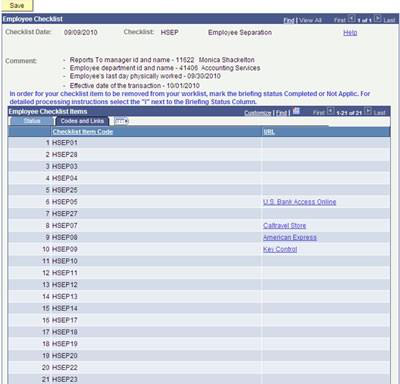
This page will be accessed by the checklist approvers. Web links have been provided here for easy access to the vendor’s sites.
For detailed processing instructions regarding the checklist item click on the icon
 to the right of the each description.
Ex. Travel Advance

Checklist Item Information
Please clear all outstanding travel advances.
Click on the  return button to back to the previous page.
How to update Briefing Status?

- Completed
- In Progress
- Initiated
- Not Applic
- Notified
- Received
* Remember to Save
Roles and Responsibilities
This document is divided into three sections providing instructions for the online separation process for the employee, manager, and the checklist authorizers all are responsible for clearing the employee checklist items.
Employee
It is the employee’s responsibility to monitor their checklist to ensure that all items on the list have been completed prior to their last day work. The one item assigned specifically to the employee is to confirm all assets returned. You will need to update the status on the list to Completed prior to your last day worked.
Manager/Chair
It is your responsibility to monitor your employee’s checklist to ensure that all items on the list have been completed prior to their last day worked. You will also be responsible for the collection of the following assets and updating the briefing status of the item on the checklist.
- Collect and destroy parking permit
- Collect all departmental issued assets
Checklist Approver
You have been designated as the individual in your respective area that is responsible for the clearance of an asset issued to an employee on their checklist. You will login daily to the My Fresno State Portal, click on the Human Resources Activities, HR Transaction, My HR Worklist, from there you will access the Separation Checklist for all separating employees.
The Workflow page will be updated nightly adding those employees who have initiated the separation process with Human Resources and or Faculty Affairs.
This HTML version was generated with AI assistance and may contain errors or omissions. The original approved PDF remains the official document of record. An alternative accessible format is available upon request from the document creator in accordance with Title II of the ADA.