Quick Reference Guide – Student Employment and Student Time Entry
QUICK REFERENCE GUIDE – STUDENT EMPLOYMENT
- Check your Fresno State email immediately for instruction and links to complete new hire paperwork. Page 1 - NEW HIRE Guide
- Complete documents, click “Accept”. Page 1 - NEW HIRE Guide
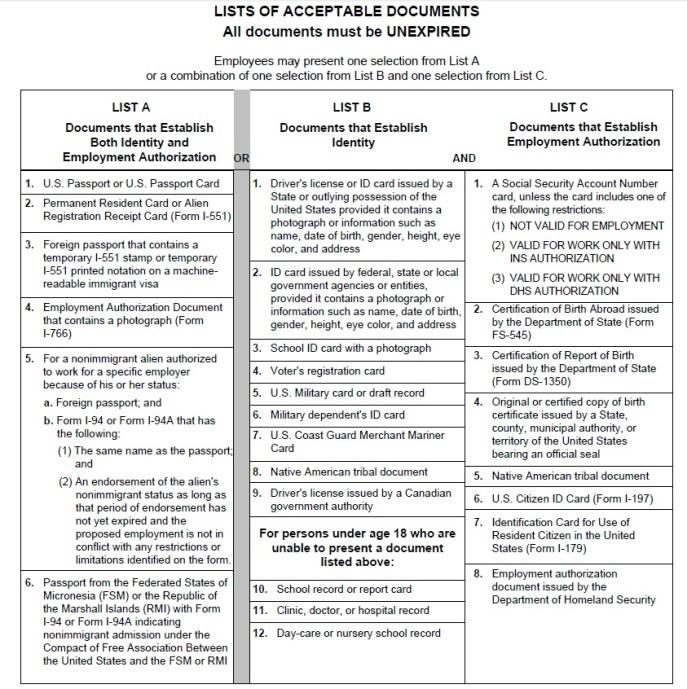
- Within 3 days, provide Human Resources (Joyal, Rm. 211)with original documents to verify your identity and/or employment eligibility. Page 1 - NEW HIRE Guide
- Bring original Social Security card for State of California payroll purposes. Page 1 – NEW HIRE Guide
QUICK REFERENCE GUIDE – STUDENT TIME ENTRY
- Log into myFRESNOSTATE. Page 1 – TIME ENTRY Guide
- Go to “Self Service”. Page 3 – TIME ENTRY Guide
- Go to “Report Time”. Page 3- TIME ENTRY Guide
- Go to “Timesheet”. (If you have multiple positions on campus, be sure to choose the correct position to report time to). Page 4 – TIME ENTRY Guide
- Current Time Period will display. Enter time in box under appropriate date. Page 5 – TIME ENTRY Guide
- Click “Submit”. Page 5 – TIME ENTRY Guide
- Receive confirmation Page 5 – TIME ENTRY Guide
USING WEB CLOCK (Police/Public Safety ONLY)
- Log into myFRESNOSTATE. Page 1 – TIME ENTRY Guide
- Go to “Self Service”. Page 3 – TIME ENTRY Guide
- Go to “Report Time”. Page 3- TIME ENTRY Guide
- Go to “Web Clock”. (If you have multiple positions on campus, be sure to choose the correct position to report time to). Page 8 – TIME ENTRY Guide
- Punch IN/OUT. Page 9 – TIME ENTRY Guide
- Enter TL Activity Page 9- TIME ENTRY Guide
- Click “ENTER PUNCH” Page 9- TIME ENTRY Guide
- Receive Confirmation Page 9- TIME ENTRY Guide
ENTER COMMENTS ONLY AS NEEDED Page 7- TIME ENTRY Guide
This HTML version was generated with AI assistance and may contain errors or omissions. The original approved PDF remains the official document of record. An alternative accessible format is available upon request from the document creator in accordance with Title II of the ADA.