Department Pay Period Report
The Department Pay Period Report is a report you can run to view all pay period report information for Student Employees as well as Hourly Staff Employees. This report may be run multiple times per month to monitor which employees have time outstanding that needs to be reviewed and approved. This report will also give work study balances for students under the work study program.
To Print the Department Pay Period Report, use the following path:
Reports Portfolio > Human Resources > Payroll
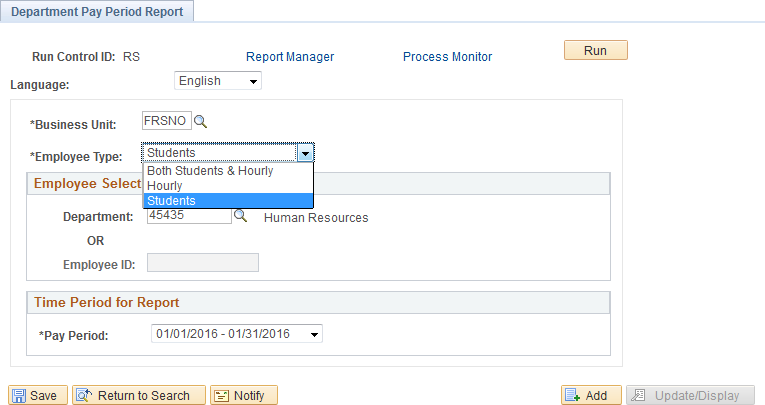
- You may sort the report by staff, hourly and student employees
- Enter Department Number
- Enter the Pay Period you would like to view.
- Click Run
- The Process Scheduler Request page will display, click Ok.
- Click Report Manager to find the Pay Period Report once it is processed.
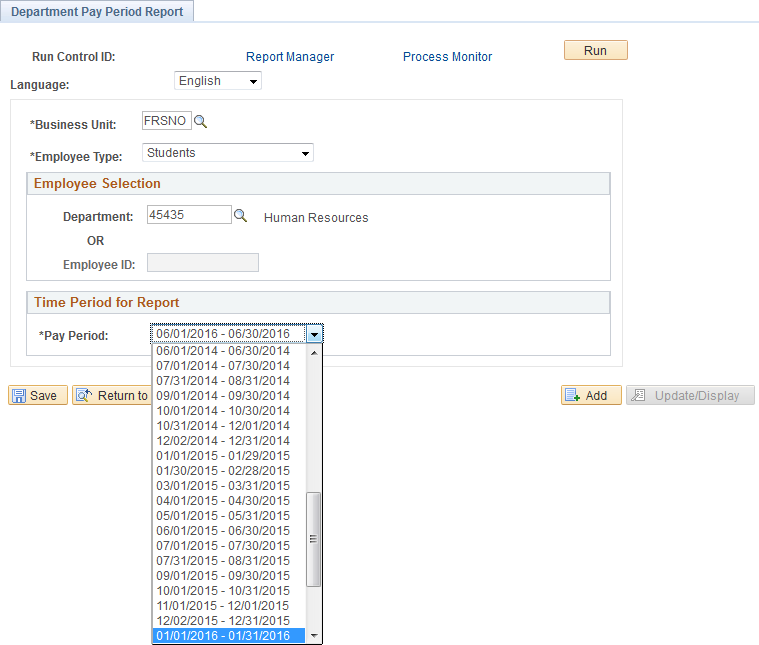
The Department Pay Period Report is shown below. The example shows the report split in half due to space limitations

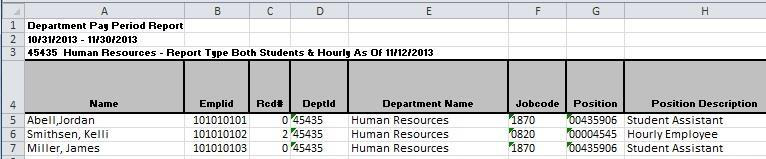
-
Reported Needs Approved: Shows Employees Reported Time
Reported Approved: Shows Time already approved by Time Keeper -
Payable Needs Approval: Time waiting for MPP/Chair approval
Payable Approved: Time already approved by MPP/Chair - Rate: Hourly rate of pay
- Estimated Gross: Amount of check before taxes
- Reports to: Reports to Manager
- Distribution Information: Chartfield being charged
- Remaining Work Study $: Amount of work study award remaining (if any).