Instructions for enrolling in EFT Non-Payroll Employee Direct Deposit
- From “My Homepage” in your MyFresnoState portal, select the “Employee Self Service” tile
- Select “Miscellaneous HR Related,” then “Non-Payroll Direct Deposit”
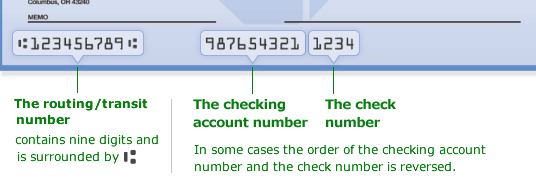
- Enter your checking account routing number and account number. These series of numbers can be found at the bottom of your checkbook.
- Agree to the Terms and Conditions
- Click the Submit button
This HTML version was generated with AI assistance and may contain errors or omissions. The original approved PDF remains the official document of record. An alternative accessible format is available upon request from the document creator in accordance with Title II of the ADA.